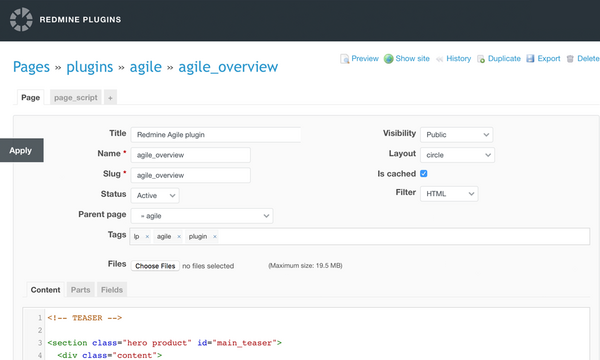

CMS system in Redmine
Build landing pages, corporate pages, blogs and more right in Redmine. This website runs on the CMS plugin

Use HTML, CSS and Liquid
Build sites with HTML and CSS, as well as the Liquid templating language

SEO-friendly pages
Add any fields, attributes, tags or other structures that matter for search engines

Fully customizable
Create and use custom page templates, code snippets, menus and more
Your plugins are professional and easy-useable. They meet all our needs. Also, I would like to say that we are very fond of your support. And we are glad that your plugins are well documented and the installation process is very easy. We have thousands of tasks or issues. So your plugins are very useful for us.
Gaoming Wu, Owner of Tecsoon
Features
Liquid code editor
Build pages with HTML, CSS and Liquid, the template language created by Shopify. The editor suggests tags, filters, fields and the names of snippets, parts, pages and files as you type, so you can also add any attributes or tags that matter for SEO to the source of your pages
Learn more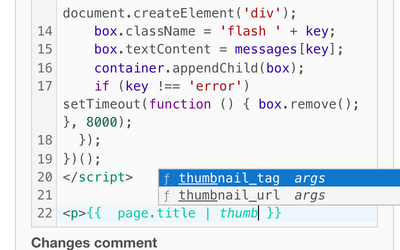
Preview before saving
Check a page, part, snippet or layout before you save it. The Preview tab next to Content shows your unsaved text, and nothing on the site changes until you save. For a snippet or part, pick a layout to see it with the site styles
Learn more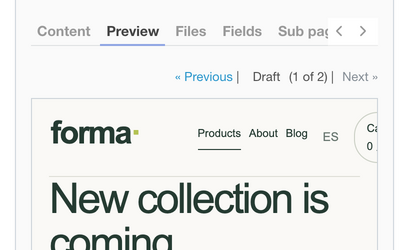
Reusable snippets
Snippets are chunks of reusable code for elements that appear on more than one page, such as a social link or a pagination block. The Used in tab lists the layouts, pages, parts and other snippets that render a snippet, so you can check it before you change or delete it
Learn more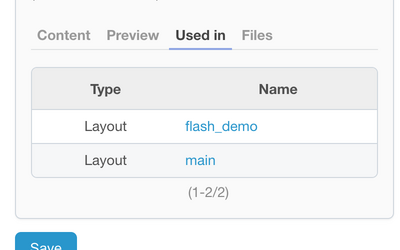
Helpdesk widget articles
Show pages of your site as articles in the Helpdesk widget. Customers read the same text in the widget as on the site, so there is no second copy to maintain
Learn more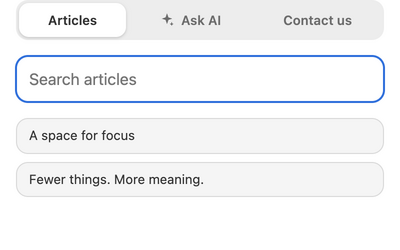
Admin toolbar
Editors see a pencil at the bottom left of every public page. Hover it to see the page name with a copy button, the Edit page and Edit layout links, the update time and whether the page is cached. Visitors never see it
Learn more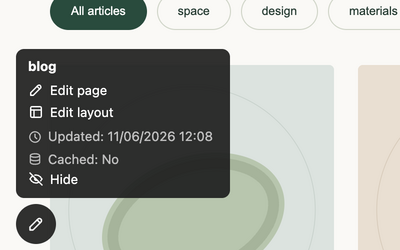
Requirements
| Redmine | 7.0 - 5.0 |
|---|---|
| Ruby | 4.0 - 3.1 |
| Database | SQLite, MySQL, PostgreSQL, SQL Server |
| OS | Linux, OS X, Windows |
| Browsers | Chrome, Safari, Edge and Firefox |
Over 160 000 companies from 120 countries use RedmineUP plugins, themes and services








Most popular plugins



Ask your favorite AI about RedmineUP CMS plugin
Already use an AI assistant? Let it help you decide if RedmineUP is a good fit.
 ChatGPT ↗
 Claude ↗
 Perplexity ↗
 Google AI ↗