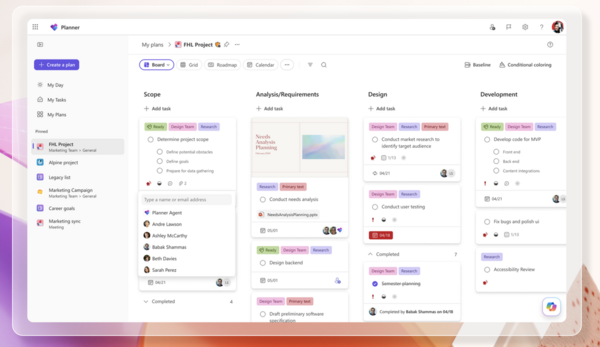
Migrating from Microsoft Project is currently a critical initiative for many organisations. The primary driver is the upcoming retirement of Microsoft Project Online on September 30, 2026, after which data will become inaccessible. .
However, the decision goes beyond a single deadline. There is an industry-wide shift toward more collaborative, flexible, and AI-enhanced tools as teams find Microsoft Project's traditional, schedule-heavy approach limiting.
Microsoft offers a few paths forward, but it's important to understand their limitations. For many PMOs, exploring alternatives outside the Microsoft ecosystem has become the more strategic choice.
- Microsoft Planner: This is Microsoft's primary direction, integrating features like Gantt charts and dependencies. It's excellent for team-level task management but has significant limitations for enterprise PMOs: a 3,000-task limit per project, missing advanced features like portfolio management, resource leveling, and financial tracking.
- Project Server subscription: This is essentially an on-premises version. It's a nearly feature-for-feature match for Project Online, but it requires you to own and manage the infrastructure. This option preserves the status quo but doesn't modernize your toolset and comes with a significant administrative overhead.
- Dynamics 365 Project operations: A full-scale platform for organizations that need deep integration with finance and professional services automation. This is more than a migration; it's a major business transformation project.
With the retirement of Microsoft Project Online on the horizon, exploring open-source alternatives has become a strategic priority for many organisations. This is especially true for CTOs looking to avoid vendor lock-in and maintain control over their data and infrastructure. Here are the best open source alternatives to MS Project, categorized by how you actually work.
Which Alternative Do You Actually Need?
Before diving in, it's important to realize that "MS Project alternatives" fall into three different philosophies:
- The Clones: Tools designed to look and feel like MS Project. Best for those who already know .mpp files.
- The Ecosystems: Comprehensive suites that handle everything from Gantt charts to bug tracking.
- The Agile Specialists: Tools that ditch the rigid timeline for iterative delivery (Kanban/Scrum). Best for your team of developers or team of creatives.
Open Source MS Project Alternative
Open-source software offers many advantages, including low cost, flexibility, transparency, community support, and reliability. Let's explore the most popular open-source MS Project alternatives:
.
1. RedmineUP
RedmineUP is the ultimate evolution of Redmine, combining the core functionality of the popular open-source project management tool with 18 premium plugins and a modern, user-friendly interface.
This enhanced version of Redmine offers advanced features like issue tracking, Kanban and Scrum boards, time tracking, custom fields and workflows, and seamless integrations with other tools. What sets RedmineUP apart is its SLA-based technical support, ensuring reliable assistance whenever needed.
One of the standout advantages of RedmineUP is its flexibility in deployment. You can choose between cloud or self-hosted options, and even start in the cloud before migrating to a self-hosted solution without any data loss. The RedmineUP cloud is managed by a highly technical support team, offering enterprise-grade reliability and security, with all data encrypted for peace of mind.
RedmineUP extends the capabilities of Redmine with premium plugins such as Agile, Helpdesk, CRM and Resources, making it a solid solution for project management, customer support and resource planning. It’s the ideal choice for teams looking to elevate their project management experience while retaining the open-source spirit of Redmine.
RedmineUP is a great fit for small and mid-sized teams seeking a flexible and customisable project management solution, especially if budget is a concern. It supports both Agile and traditional project management methodologies. See the Redmine user's use case.
Capterra rating: 4.4
Cost for Cloud subscription for 25 users: $69
Customers: NASA, BOSCH, SONY, IKEA, IBM, INTEL
Create a free RedmineUP account
2. GitLab
GitLab started as a Git repository manager and has grown into a full DevSecOps platform, with project management layered directly on top of the development workflow instead of bolted on beside it. For teams seeking an all-in-one platform infused with AI, it's a compelling choice which consolidates planning, coding, testing, security scanning, and deployment into a single application.
On the project management side, GitLab offers issue boards, epics, milestones, and burndown charts for tracking work at both the team and portfolio level. Issues can be linked directly to merge requests and pipelines, so status updates reflect actual code progress rather than manual check-ins. Built-in CI/CD and security scanning mean engineering leads get delivery visibility that a standalone PM tool simply can't offer.
GitLab is a great fit for engineering-led organizations that want project tracking to live inside the same platform as their codebase, rather than as a separate tool their developers have to context-switch into.
Captera raiting: 4.6
Cost for Cloud subscription for 25 users: $725
Customers: LOCKHEED MARTIN, UBS, NVIDIA, GOLDMAN SACHS.
3. OpenProject
OpenProject is a comprehensive open-source project management platform that offers a variety of features, including issue tracking, Kanban and Scrum boards, Gantt charts, time tracking, custom fields and workflows, and integrations with other tools. It's known for its powerful reporting capabilities and active community development.
OpenProject can be installed on-premises in your own organisation's infrastructure, giving you complete control over your data and allowing you to manage it 100% yourself. OpenProject is investing heavily in the freedom of users. This encompasses the software freedoms granted by GPLv3 and extends to the rights and freedoms granted by the General Data Protection Regulation (GDPR).
Install and run OpenProject on-premises in your organisation’s infrastructure and behind your firewall. This setup in your own infrastructure or hosting provider of your choice provides you most privacy and sovereignty over your data.
Capterra rating: 4.6
Cost for Cloud subscription for 25 users: $191
Customers: SIEMENS, DELOITTE, AUDI, SANOFI, GREENPEACE.
Create a free OpenProject account
4. GanttProject
Best for: Simple projects, freelancers, and those who want to stay offline.
Sometimes MS Project is simply overkill. GanttProject strips away the enterprise bloat and focuses on the essentials: scheduling and resource assignment.
The Big Win: It's fast, local-first, and requires zero configuration. You install it and start drawing your timeline immediately. The Trade-off: It lacks advanced resource leveling and portfolio management. Key Outcome: Get a project plan mapped out in 15 minutes without fighting a complex UI.
Capterra rating: 4.2
Create a free GanttProject account
5. Taiga
Taiga is an open-source project management tool designed to help teams manage their projects efficiently using Agile methodologies. It is particularly popular among startups, software development teams, and organizations that follow Scrum or Kanban frameworks. Taiga’s user-friendly interface, flexibility, and robust feature set make it an excellent choice for teams looking to streamline their workflows and improve collaboration.
As an open-source tool, Taiga is highly customizable and can be self-hosted, giving teams full control over their data and infrastructure. It integrates seamlessly with popular tools like GitHub, GitLab, and Slack, making it ideal for software development teams, startups, and remote teams.
Capterra rating: 4.3
Cost for Cloud subscription for 25 users: $70
Customers: AIRBUS, ORANGE, HP, DECATHLON.
| Tool | Category | Best For | Deployment | Standout Feature |
|---|---|---|---|---|
| RedmineUP | Ecosystem | Small/mid teams wanting one flexible, extensible platform | Cloud or self-hosted | 18 premium plugins (Helpdesk, CRM, Resources) |
| GitLab | Ecosystem | Dev teams wanting code + project management unified | Cloud or self-hosted | Full DevSecOps lifecycle in one app |
| OpenProject | Ecosystem | Teams wanting a modern, privacy-first MS Project replacement | Self-hosted (on-premises) | GDPR-driven data sovereignty |
| GanttProject | Clone (lightweight) | Freelancers and simple, offline scheduling | Desktop (local) | Zero-configuration setup |
| Taiga | Agile Specialist | Startups and Scrum/Kanban-driven dev teams | Cloud or self-hosted | Clean, developer-friendly UI |
The MS Project landscape is changing, and September 30, 2026 will be here sooner than you think. Whether you're proactively looking for alternatives or being pushed by Microsoft's retirement deadlines, open source options have never been stronger.
Migration from MS Project
If your MS Project setup is large, deeply customised, or simply too tangled to untangle yourself, RedmineUP offers a dedicated migration from MS Project service. Our DevOps team will review your existing MS Project structure — tasks, dependencies, resources, and custom fields — and map out a clear, tailored migration path before a single file gets touched.
Migration is usually completed within one business day, and performed in suitable time for your team, independent of your timezone. To book the migration service drop us a message. A team of experts will check your MS Project environment and recommend the best course of action.