

No distractions
Work with the text in the full-screen mode without distractions. Enjoy a big font, hideable formating panel, preview and submit from the zen mode

Safe editing
Work with the text without the risk of accidentally losing it. Drafts are saved every 30 seconds and are shown up when you return to the page

Notify stakeholders
Use mentions to notify teammates or stakeholders. They will receive an email notification. No need to assign everyone as a watcher

Works across Redmine
The Zenedit plugin features are compatible with wikis, news, forums, issues, comments, notes, contacts and any other form of the text area
Zitec benefits greatly from your products and they turned our Redmine into more than an issue tracking system.
MARIUS BALTEANU, HEAD OF QUALITY ASSURANCE & PARTNER AT ZITEC
Features
WYSIWYG Editor
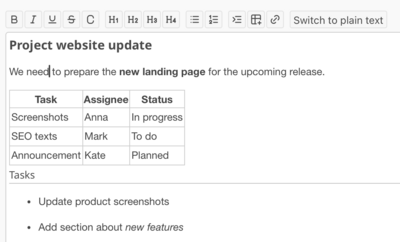
Edit content in a visual WYSIWYG editor for Markdown without typing Markdown syntax manually. Use the toolbar to create headings, lists, tables, and links while instantly seeing the formatted result. You can switch between visual editing and plain Markdown mode at any time, with the content automatically converted to standard Redmine Markdown format
Drafts
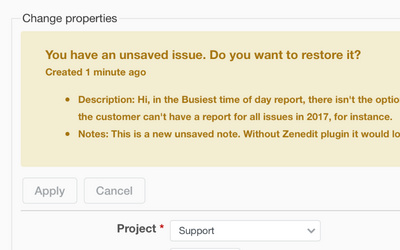
The plugin saves drafts for issues and wikis, which helps to finish them later and protect you from the unwanted loss of the data. Drafts are saved automatically every 30 seconds. If you return without previously publishing the material, the system will notify you about a draft available
Real-time Presence
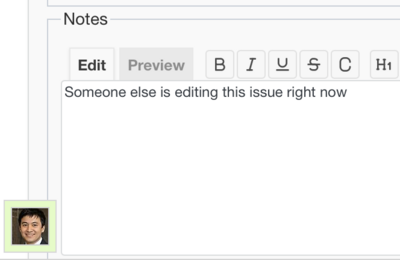
Instantly see which team members are viewing or editing a task through live presence indicators. When a colleague opens an issue or starts a draft, their pulsing avatar signals active work to prevent edit collisions. This visual synchronization ensures your team stays coordinated and avoids overlapping updates in real time
Full-screen zen edit mode
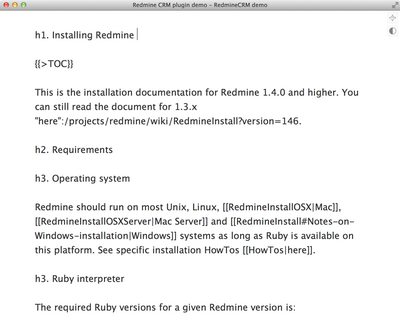
The plugin adds Zen button on every text editing area across Redmine. Now you can edit text in the full-screen Zen mode – you see only the text field, with the big font and hideable top formatting panel so that you can focus entirely on writing. You can use two themes—light or dark
Requirements
| Redmine | 7.0 - 5.0 |
|---|---|
| Ruby | 4.0 - 3.1 |
| Database | SQLite, MySQL, PostgreSQL, SQL Server |
| OS | Linux, OS X, Windows |
| Browsers | Chrome, Safari, Internet Explorer and Firefox |
Over 150 000 companies from 120 countries use RedmineUP plugins, themes and services