
Your Redmine admin just quit. Maybe they handed things over, maybe they didn’t have time. Either way, nobody else has the root password. The plugin licenses sit under their personal email. The last backup is three months old.
.
This happens more than you’d think. It’s one of the most common support requests we get: a company that just lost the one person who really knew their self-hosted Redmine. Here’s the 48-hour checklist to take back control, and the fix so it never happens again.
Why losing your Redmine admin is scarier than a server crash
A crashed server is a known problem. You can see the error, you can restart the service, and worst case you restore from a backup. A departed admin is an unknown problem: you don’t find out what you’re missing until the moment you need it, a DNS record that only they could edit, a plugin license tied to their personal inbox, an SSH key nobody else has.
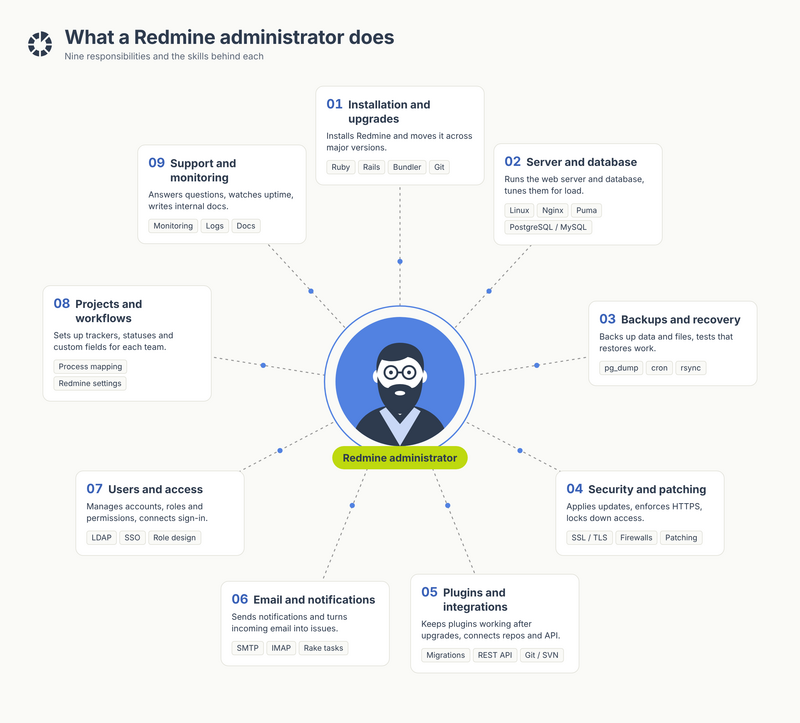
It’s easy to underestimate how much one person is actually carrying until you list it out. Here’s what “the Redmine admin” usually means in practice, nine distinct jobs, each with its own tools and its own learning curve. None of it is written down anywhere except in their head.
Take the PHP emergency patches from October 2026: two critical remote-code-execution flaws, CVE-2026-109618 and CVE-2026-109619, with a patch window measured in hours and exploitation already underway before most admins had even seen the advisory. Redmine itself runs on Ruby, not PHP, but the lesson holds for anything else in your stack built on it, a CMS, a plugin, a shared server. If nobody is actively watching security advisories for every piece of your self-hosted install, a patch window that closes in a day just doesn’t get used.
We’ve already covered what to do when Redmine itself goes down, database contention, plugin conflicts, infrastructure limits. This article is about a different kind of outage. The server runs perfectly fine. The one person who could log into it just doesn’t work for you anymore.
The first 48 hours: an emergency checklist
Don't wait for something to break. Work through this the moment you know your admin is leaving, or immediately if they already have:
- Inventory every credential they could touch: the Redmine admin account itself, the database, SMTP settings, LDAP/SSO identity provider, plugin license keys, the domain registrar, the SSL certificate provider, backup storage (S3 or similar), and the Git/SVN repository host.
- Rotate anything they could still reach: change the root/SSH password, revoke API tokens and personal access tokens, disable (don't delete) their Redmine account so issue history stays intact, and re-point any 2FA tied to their phone.
- Confirm your backups actually work. A backup you haven’t test-restored is a backup you don’t have. Do a trial restore now, not during the next incident.
- Find out who else can make infrastructure-level changes: a second admin, your hosting provider's support team, or an outside dev agency on retainer.
- Write down everything you find, even roughly. A messy runbook beats no runbook.
Note: step 3 is the one teams skip, and it's the one that turns "our admin left" into "we lost two years of tickets." Test the restore before you need it, not after.
Recovering Redmine access you don’t control
Sometimes the credentials aren’t just missing. They’re tied to an account you don’t legally control. Common patterns we see:
- The hosting account (AWS, DigitalOcean, a VPS provider) was opened under the former admin's personal email, with no company contact on file.
- A Redmine instance deployed via a Bitnami stack or a one-click image, where only the admin knew the docker-compose file, the volume mounts, or which ports were exposed.
- Plugin or add-on licenses purchased with a personal card and a personal email address.
- A domain registrar or SSL certificate account with no secondary admin added.
If you still have server access, document the setup immediately. Docker-compose files, cron jobs, nginx configs, the works, before anyone touches anything. If you don’t have access, most registrars and cloud providers have a business-ownership recovery process. It’s slow, but it works if you can show invoices or payment records. In the meantime, a tested backup (see the checklist above) is what lets you rebuild on infrastructure you actually control, instead of waiting on a support ticket with a provider that has no reason to prioritize you.
The root cause: self-hosted Redmine and the bus factor
None of this is a flaw in Redmine. Redmine's own documentation is clear that self-hosting means you own the whole stack: the database, the web server, the OS patches, the backups. That's exactly why self-hosted Redmine is popular with teams who want full control and data sovereignty.
The trade-off is what engineers call “bus factor”: the number of people who’d need to disappear before a project stalls. A lot of self-hosted Redmine installs have a bus factor of one. It works fine for years, right up until it doesn’t. And the failure mode isn’t a crash. It’s a resignation letter.
Self-hosted vs. managed Redmine hosting: who actually holds the keys
This is really the question underneath "self-hosted Redmine vs. managed": not which is more powerful, but who is left holding the keys when one person leaves.
- Self-hosted Redmine (your own VPS, a Docker container, Redmine on AWS): you own every credential, and every risk that comes with concentrating them in one or two people's heads.
- Managed Redmine hosting (sometimes called Redmine SaaS or Redmine cloud): the provider’s support team, not a single named employee, holds the operational knowledge. Access, backups, and renewals are documented and shared across a team with on-call coverage, so they survive any one person’s departure, including yours.
Neither option is "wrong." A well-run self-hosted instance with good internal practices can be just as resilient as a managed one. But managed Redmine hosting removes the bus-factor problem by design, which is why it's the first thing we recommend to any team that's just been burned by losing their admin. If budget is the open question, our Redmine pricing page breaks down what managed hosting actually costs against the engineering hours you're currently spending on server maintenance.
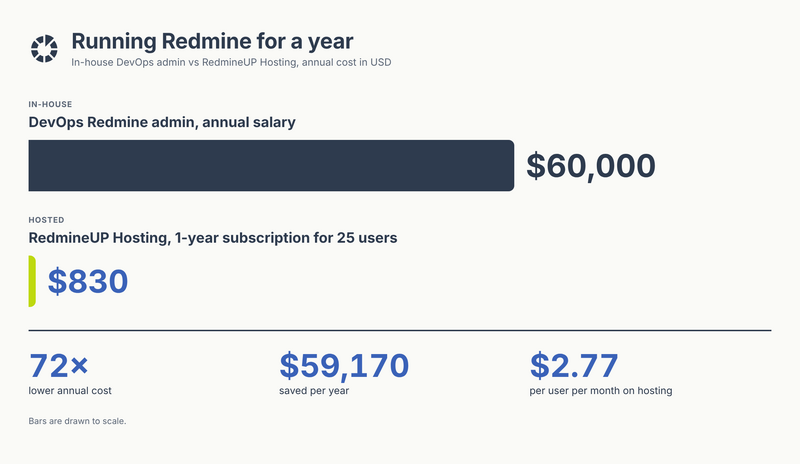
Most teams never actually run these numbers side by side. Here’s what a dedicated DevOps hire to keep Redmine patched, backed up, and online full-time actually costs against a RedmineUP Cloud subscription for the same team. The $60,000 line isn’t hypothetical. It’s the salary of the exact person this whole article is about, the one whose knowledge walks out the door with them.
How managed Redmine hosting removes the single point of failure
Note: moving to managed hosting doesn't mean giving up the plugins or customizations you've built. If your setup leans on third-party add-ons, it's worth checking our roundup of the best Redmine plugins for project management first, so you know what needs to carry over.
With RedmineUP Cloud, several things change at once:
- No single point of access. Our support team shares documented access to your instance’s infrastructure. Nobody has to remember a root password that only exists in one person’s head..
- Backups that are actually tested, on a schedule, by people whose job is exactly that.
- SSO instead of local-only accounts, so your team authenticates through your own identity provider rather than a Redmine admin account that someone could lock you out of.
- A documented migration path off whatever you're running now (a bare VPS, a Docker container, an old Bitnami image on AWS), handled by our installation team rather than reverse-engineered from whatever configuration files you can find.
Migrating from Bitnami, Docker, or a VPS you've outgrown
If your departed admin set things up on a "Bitnami" stack or a hand-rolled Docker Compose file, migrating to managed hosting is usually simpler than people expect: we work from your existing database and attachments, not from documentation that may not exist. The short version of how to migrate Redmine to the cloud: export your database and the /files directory, hand them to the migration team, and we rebuild the instance on infrastructure your whole team, not one person, can see and manage. For heavier customizations or a non-standard setup, our custom development team can rebuild plugin behavior that doesn't migrate cleanly on its own.
Building a Redmine admin hand-off process so this never happens again
Whether you move to managed hosting or decide to keep self-hosting, the underlying fix is a process, not a tool:
- Keep every credential in a shared team vault (1Password, Bitwarden, or similar), never in one person’s personal password manager.
- Prefer SSO/LDAP over local admin accounts wherever Redmine supports it, so access is tied to your identity provider, not a one-off login.
- Name a second admin, even a light one, before you need them, not after.
- Add "infrastructure access" as its own line item in every offboarding checklist, right next to laptop return and badge deactivation.
- Review who has root or admin access on a fixed schedule, quarterly is a reasonable default, rather than “whenever we remember.”."
This also matters for compliance: if your team handles client data under GDPR or similar rules, an admin account nobody can account for is a real audit finding, not just an inconvenience. Treating Redmine security as a shared, documented responsibility, rather than one person’s tribal knowledge, is the same practice whether you’re protecting against a resignation or a breach.
If you'd rather not own this process at all, ongoing Redmine maintenance from a provider is the simplest way to guarantee it's never just one person's job again.
Move to hosting your whole team can manage
FAQ
Can I migrate Redmine to the cloud without losing data?
Yes, a migration carries over your existing database, attachments, and issue history. The main risk isn't data loss, it's time: the less documentation your previous admin left behind, the longer discovery takes. That's exactly why a tested backup and a written runbook (see the checklist above) make any later migration faster, whether it happens next month or next year.
What's the difference between Redmine VPS hosting and managed hosting?
With VPS hosting (your own server on AWS, DigitalOcean, or similar), you or your admin are responsible for OS patches, backups, uptime monitoring, and every credential involved. With managed Redmine hosting, that operational work, and the access that goes with it, belongs to the provider’s team, which is the core reason it holds up better when staff changes.
Is managed Redmine hosting expensive compared to self-hosting?
Self-hosting looks cheaper until you count admin time, backup storage, SSL renewals, and the risk of exactly the scenario this article is about. Our pricing page lays out plan costs directly so you can compare them against what a few hours of emergency recovery work would cost you.
Does RedmineUP Cloud keep data inside the EU?
RedmineUP hosts your data at an ISO-certified data center matching your company’s location, and the platform is GDPR compliant. If staying inside the EU is a hard requirement for your compliance team, confirm the exact data center region with RedmineUP support before signing up, since “your location” is set per account rather than fixed to one region.
Can I try it before committing?
Yes, you can start a free trial of RedmineUP Cloud and bring over your existing data to see how it runs before deciding on a plan.