RedmineUP - alternative to Jira Software
- Agile Board
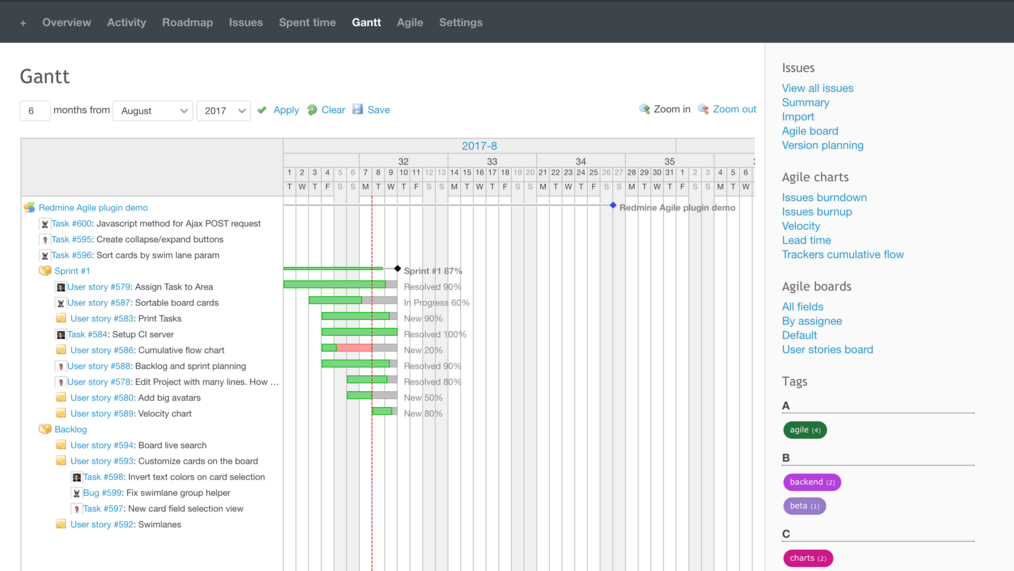
- Gantt Chart
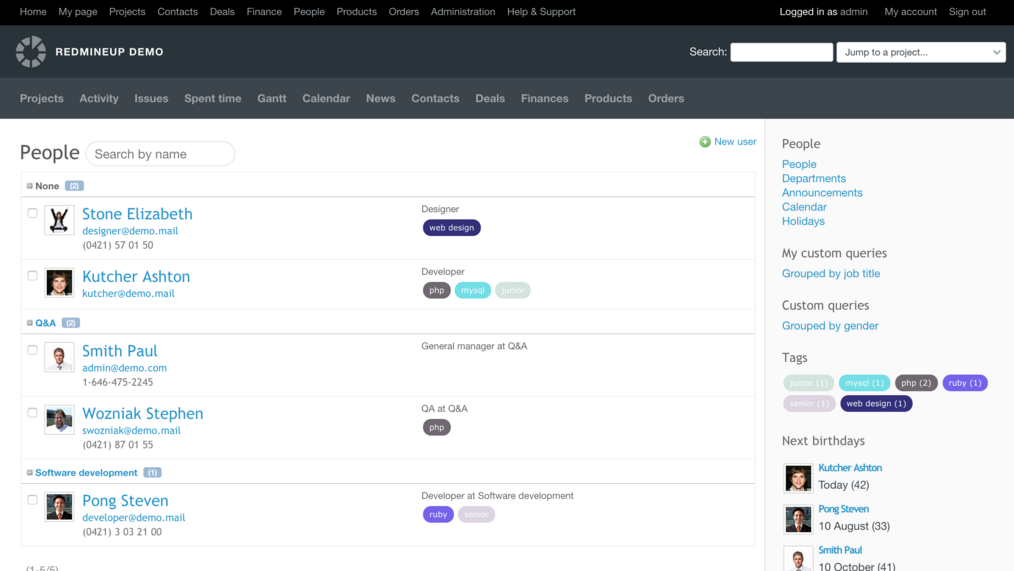
- Team Management
- Time Tracking
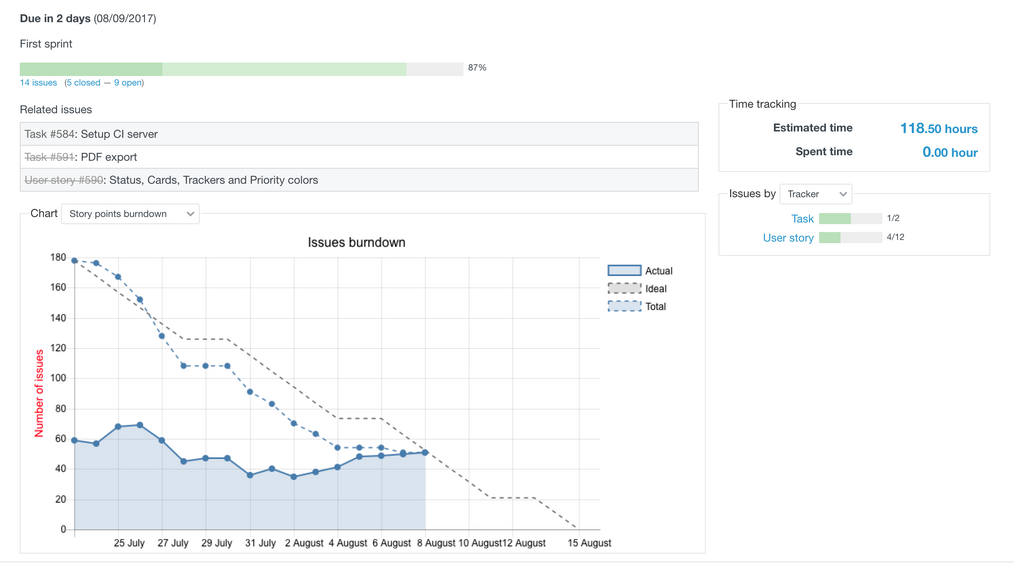
- Reports
Use Agile whiteboard to easily organize your work and optimize its flow. Move tasks with drag&drop, comment and create new issues with one click

Your Commander Overwiew of a project. Gantt chart gives you in-depth correlation between what's planned and what's being delivered
Visualize the current status and progress of the projects in a glimpse of an eye. Use Burn-down, Burn-up, Cumulative Flow, Velocity or Lead Time chart
Have your team working like in a clock. Manage user roles, group people in team & departments, set permission rules, use notifications
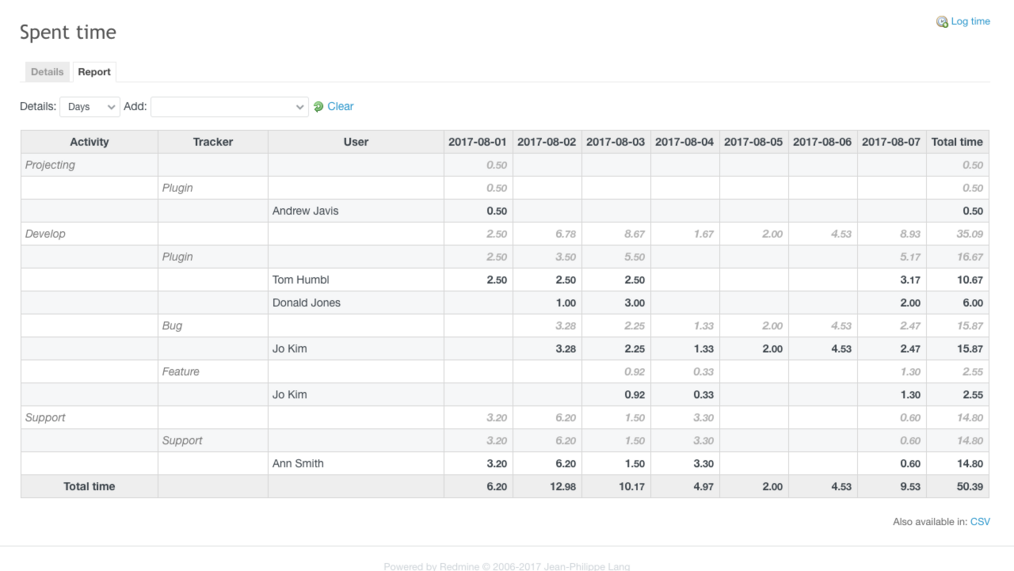
Bill clients for hours worked faster, than making a cup of coffee with simple to use time tracking, advanced fitering and reporting
Visualize the current status and progress of the projects in a glimpse of an eye. Use Burn-down, Burn-up, Cumulative Flow, Velocity or Lead Time chart
What replaces your Jira setup
In Jira, many everyday needs mean extra Atlassian products or Marketplace apps. In RedmineUP they are plugins that work together in one tool.
| What you need | In Jira | In RedmineUP |
|---|---|---|
| Scrum and Kanban boards | Jira Software | Agile plugin: boards, sprints, burndown and velocity charts |
| Service desk | Separate product: Jira Service Management | Helpdesk plugin: email tickets, SLA, canned responses, website widget |
| Knowledge base | Separate product: Confluence | Built-in Redmine Wiki in every project |
| Automation and AI | AI features (Rovo) only in Jira Cloud | Agent plugin: an AI agent inside your Redmine, on your server or in the cloud |
| Roadmaps and team workload | Advanced planning in higher plans or Marketplace apps | Built-in Gantt chart and Resources plugin |
| Timesheets, budgets and invoicing | Marketplace apps (e.g. Tempo) | Built-in time tracking, Budgets and Invoices plugins |
| Checklists | Marketplace apps | Checklists plugin |
| Reports for managers | Dashboards; custom reports via Marketplace apps | Reporter plugin: report templates with charts |
| Clients, contacts and deals | Not part of Jira | CRM plugin: contacts, companies, deals |
| Employee directory and teams | Marketplace apps | People plugin |
| Where it runs | Jira Cloud. Data Center ends on March 28, 2029 | Your server, your server managed by us, or RedmineUP Cloud |
Over 150 000 companies from 120 countries use RedmineUP plugins, themes and services








Switch from Attlasian Jira to RedmineUP
Free data migration. Choose enterprise ready solution today.

Why teams choose RedmineUP over Jira
— Peter Gaarde, Head of Software Development, RSP SystemsIt takes time to get into the ‘issue tracking mindset.’ We tried Jira and Trello, but if we had to go all-in, it would be more expensive, and it doesn’t have all the features inside, such as helpdesk or invoicing.
Read how re:Store moved from Jira and saves $10,000+ a year

What people are saying about RedmineUP:

Easy to use software, easy to setup and administrate. A very good project management tool for the value, I highly recommend!

— Anthony Mele
rating from Capterra
This platform changes the behavior of Redmine software. I am sure that we can trust Redmineup services while we are adopting Agile to our teams.

— Akin Ömeroğlu
rating from Capterra
RedmineUP allows to connect one application using API, this feature allows to manage project in redmine from other application.

— Francisco Paredes
rating from Capterra
Choose how you run RedmineUP
We migrate your Jira data to any option
- Server: yours, offline networks too
- Initial setup: your admins
- Updates: your admins
- Technical support: RedmineUP plugins
- Jira migration: on request
- Users: unlimited
- Custom plugins: any
- Billing: plugin licenses
- Server: yours
- Initial setup: Redmine and all RedmineUP plugins installed by us
- Updates: Redmine and plugins, by us
- Technical support: with SLA
- Personal manager: one contact for your team
- Consulting: workflows, setup and best practices
- Jira migration: included
- Users: unlimited
- Billing: 1-year contract
- Server: RedmineUP Cloud
- Initial setup: ready in minutes
- Updates: by us, with backups
- Technical support: Redmine and plugins
- Personal manager: Enterprise plan
- Jira migration: from Business plan
- Users: from 25, unlimited on Enterprise
- Billing: monthly or annual
FAQ
How does Jira data migration work?
You send us your Jira details, we prepare a free migration plan, test it on one or two projects, then move all agreed data: projects, issues, comments, attachments, custom fields and users. Your team checks the result before you switch. See how the migration works.
How much does RedmineUP cost?
It depends on your setup: the number of users, where RedmineUP runs and the services you need. RedmineUP Cloud starts at $69 per month; for self-hosted and managed options we prepare an offer based on your current Jira configuration. Request a price.
How is RedmineUP different from free Redmine?
RedmineUP is the same open-source Redmine, extended with our professional plugins: Agile boards and charts, Helpdesk, CRM, checklists, resource planning, invoices and more. You also get a modern theme, regular updates of Redmine and plugins working together, and support from the team that builds them. Your data stays in standard Redmine, so you are never locked in. See all plugins.
Can we keep RedmineUP on our own servers?
Yes. Run it yourself, have us install and maintain it on your infrastructure, or use RedmineUP Cloud. It also works in closed networks without internet access.
Can we test it before buying?
Yes. Start a free RedmineUP Cloud trial: it has the same Redmine and RedmineUP plugins you would run on your own server. We can also migrate one or two of your Jira projects into your trial, so your team tests with real data.
What does Jira migration cost?
It depends on the number of projects, issues and attachments. You get a fixed estimate in the free migration plan, before you commit. Request your migration plan.
How long does Jira migration take?
It depends on the size of your Jira, but on average your new RedmineUP workspace with migrated data is ready within a week. We agree the exact timeline in your migration plan.
Is there a replacement for Jira Service Management and Confluence?
Yes: the Helpdesk plugin for service desk and the built-in Redmine Wiki for documentation. Apps without a direct equivalent, like Atlassian Assets, are reviewed in your migration plan.
Where do you store our data in RedmineUP Cloud?
We use AWS infrastructure in Ireland (Europe), certified to ISO/IEC 27001. See our security practices and policies.
Can you fill in our security questionnaire?
Yes. Send it to us and we will answer it as part of your migration plan. We can also sign an NDA.
What support do we get?
Managed and Enterprise customers get technical support with SLA and a personal manager who knows your setup.
Can we use our own or third-party plugins?
Yes on your own server. In RedmineUP Cloud, third-party plugins are available for Enterprise clients.