What's new in Redmine Planner plugin
Projects chart, Quarters and Years scales, cascade in the draft and a clearer Review changes
New features
Projects chart
Set Chart type to Projects and Planner draws the project tree the way the Redmine Gantt does: every project with its versions and issues. Each project gets a Summary bar with the project name and a fill that shows its progress, and Display issues can hide the issues and leave only the tree. PRO version.
Learn more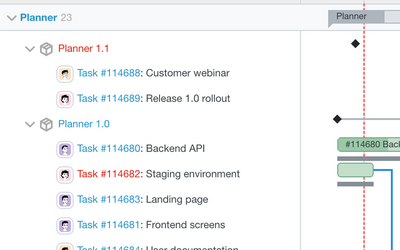
Zoom and scales
Zoom in and out from Years to Days with the new Quarters and Years scales, or pick a Scale next to Previous / Next. Today brings the current date into view, Fit frames the whole schedule (PRO), and Ctrl/Cmd + mouse wheel zooms around the pointer. The scale changes without a page reload and keeps your Undo / Redo.
Learn more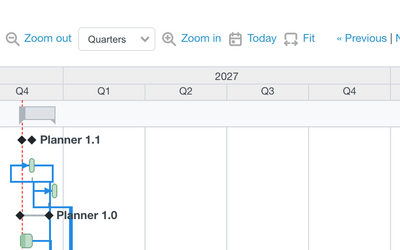
Cascade in the draft
Move or resize an issue and its successors that would start too early shift with it in the draft, so dependencies stay valid while you plan. A notice tells how many successors were shifted, and a dependency that would form a cycle is refused. PRO version.
Learn more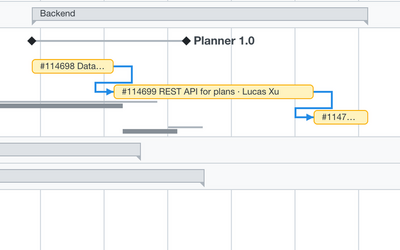
Review changes
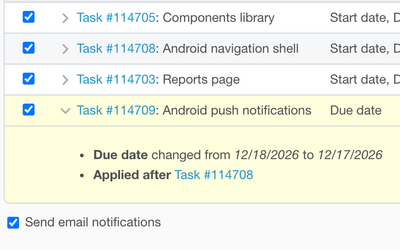
Review changes lists one line per issue: expand a row to see every date change, warnings and "Also moves" for successors. Changes are applied in dependency order, and "Applied after" shows what has to go first. Send email notifications is on by default; untick it to apply the changes without mail.
Learn more