

Artificial intelligence is rapidly becoming integral to our daily workflows. The Redmine community has been eagerly anticipating AI-powered tools to automate routine tasks and boost productivity. Today, we're exploring the first free plugin to answer that call: AI Helper, developed by Haruyuki Iida.
.
So, we've talked about the theory behind bringing AI into your Redmine project management. Now, let's get practical. What does it actually look like in action?
If you're looking for a tool to help cut down on daily chores, there's a plugin you should see. Here's a hands-on guide to getting started with the AI Helper plugin right inside your Redmine.
Haruyuki Iida , Author of
AI Helper Redmine plugin Is a skilled software developer and a significant contributor to the Redmine ecosystem. He has developed several popular Redmine plugins, including the Code Review Plugin, Wiki Extensions Plugin, and Logs Plugin. He specializes in enhancing the Redmine project management and issue tracking platform through modern AI-powered integrations.
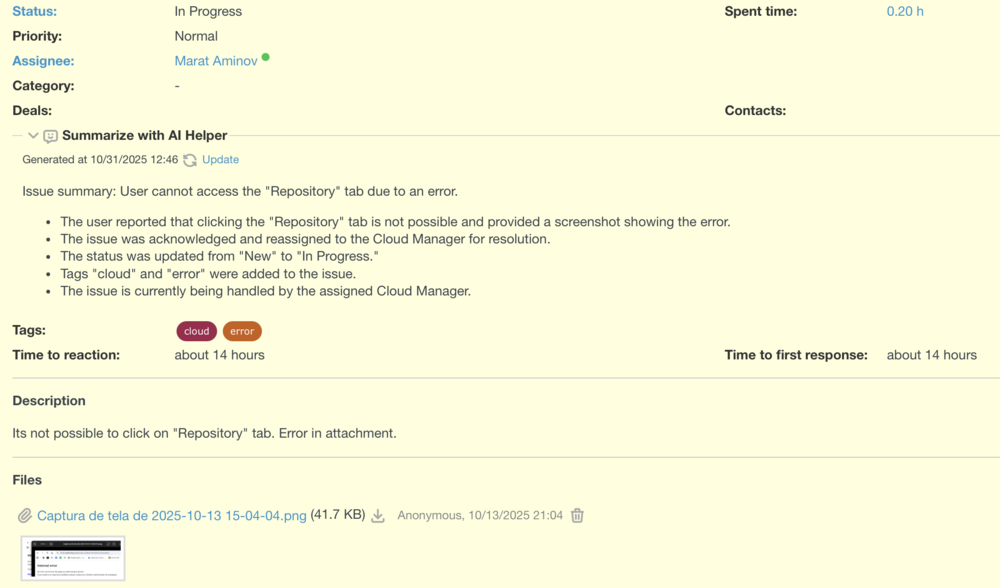
Key plugin features
- Content creation & refinement: Draft and edit text directly within your workflow. These tools can generate comment drafts, automate writing tasks, and offer intelligent suggestions to improve grammar, style, and tone.
- Intelligent summarization: Quickly distill key information from lengthy documents, articles, or meeting notes, saving time and improving comprehension. Developer Tools: Accelerate coding within IDEs with features like intelligent code completion, code generation, in-depth code explanation, and automated documentation.
- Provides a project health report: Analyze data sets, locate related content based on semantic similarity, and generate project health reports directly within project management platforms.
- Context-aware assistance: Interact with a built-in chat interface that understands your current task, providing relevant answers and support without leaving the application.
- Advanced search & data retrieval: Power precise, context-aware information discovery using vector search engines like Qdrant, and enable complex tool integration through MCP server connectivity.
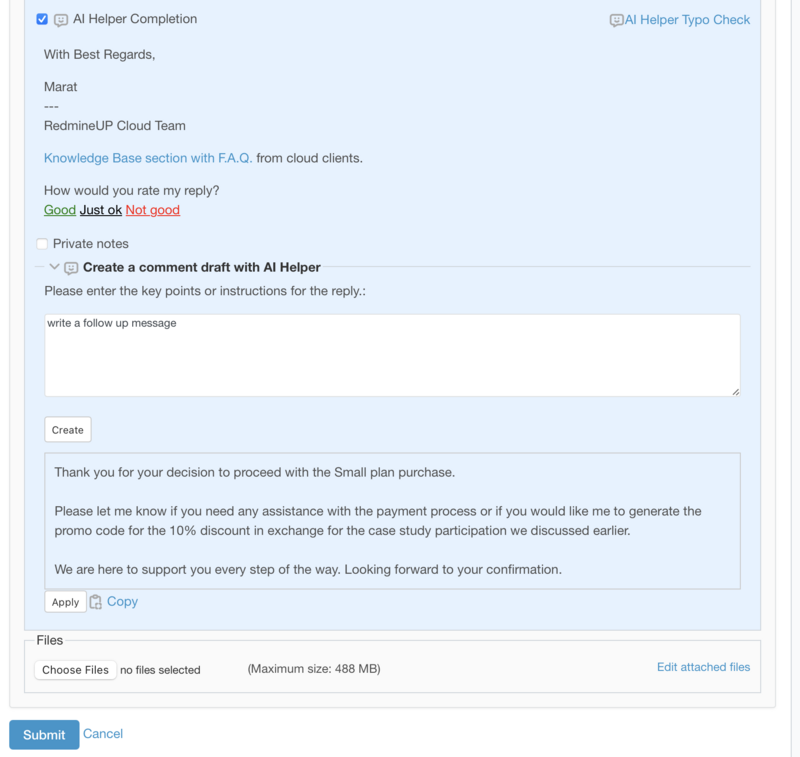
Create a draft of customer reply
A primary use case for the AI Helper plugin is rewriting customer support responses. It enables you to instantly craft polished, grammatically perfect replies in any language, perfectly tailored to the conversation's context.
Dimitar Chervenakov , Head of
Customer Care at RedmineUP At RedmineUP, we handle hundreds of incoming requests in multiple languages daily. While we utilize a CRM and canned responses, maintaining a personalized, contextual understanding for each customer remains challenging. By integrating the AI Helper with our Helpdesk module, we can now compose accurate and context-aware replies quickly and effortlessly.
The AI Helper Plugin includes a feature to automatically draft issue comments for you.
To use it:
- Navigate to the issue where you want to post a comment.
- Click the "Create" button in the comment section.
The plugin will analyze the issue's content and generate a relevant comment draft. You can then review, edit, and post the draft as you see fit. This feature is designed to save you time when creating initial responses or updates.
AI Helper plugin and RedmineUP plugins
In a previous post, we explored the new features of Redmine 6.1 We are hopeful that a future release, like Redmine 6.2, will integrate native AI helper functionality, as it has become a powerful tool for streamlining daily tasks. In the meantime, we recommend contacting our technical team to discuss setting up an AI helper plugin for your current Redmine instance.
While the AI Helper plugin and RedmineUP plugins are separate products, they are designed to work synergistically within Redmine 6.1. The AI Helper acts as the "intelligent brain," while RedmineUP plugins provide the robust "body" of advanced project management features. Together, they transform a standard Redmine instance into a powerful, AI-augmented workbench.
If you're just getting started with Redmine, we recommend checking out our Redmine implementation guide.
At RedmineUP Cloud we have an expert who can share some use cases and best practices. It will be helpful to discover Redmine 6 and find out the best way to configure Redmine for your team.
To ask a Redmine expert, drop us a message. A team of experts will check your Redmine use case and recommend the best course of action.