

For many businesses using Redmine, a self-hosted instance has been the standard. It offers a sense of control and security, but as the world moves to the cloud, many are considering migration. A common concern, especially for those operating within the EU, is whether a cloud-based solution can truly be as secure as an on-premise one.
.
Many EU businesses hesitate to move from self-hosted Redmine to the cloud due to concerns about:
- Data privacy (GDPR compliance, unauthorized access risks)
- Data location (Where is the data stored? Is it within the EU?)
- Control & transparency (Who manages the infrastructure? How are breaches prevented?)
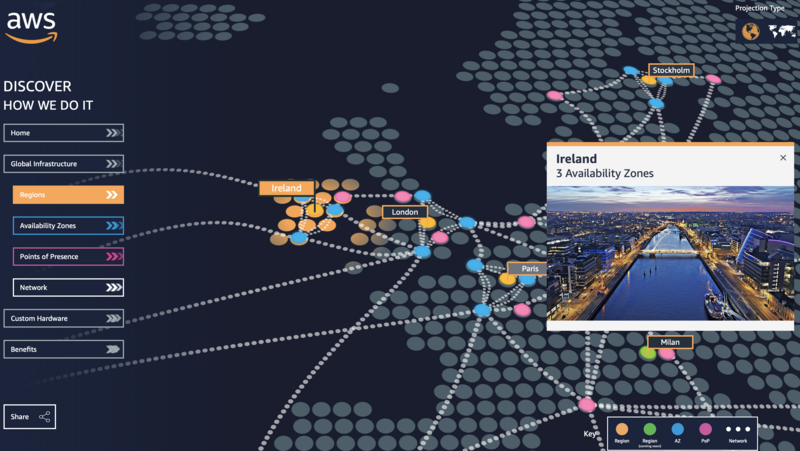
However, a properly configured cloud solution can be even more secure than self-hosting, while also reducing costs and IT overhead.
Without dedicated IT staff, critical software updates and security patches are often delayed or missed entirely, leaving systems vulnerable. Reliable backups are another common weak point—without a strict, automated backup policy, companies risk permanent data loss from ransomware attacks, hardware failures, or simple human error.
Almost 30% of IT leaders say their companies plan to increase spending on the cloud during the next 12 months, according to a recent BCG survey,
This checklist outlines seven crucial security mandates that any Redmine cloud provider should meet to ensure your data is protected and compliant with EU regulations.
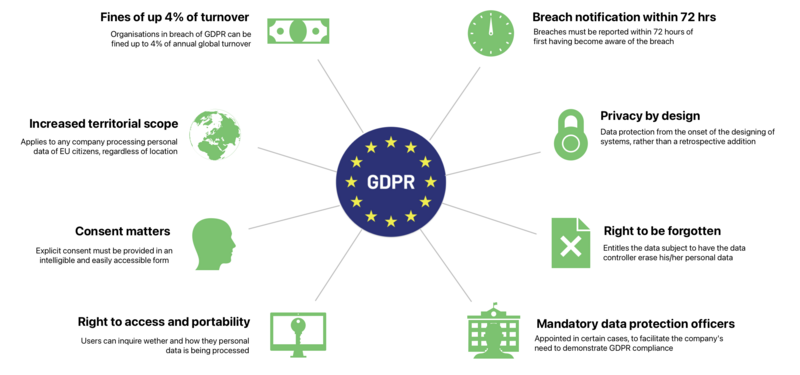
1. GDPR compliance for Redmine – mandatory for EU hosting
When you self-host Redmine, you become the data controller—meaning GDPR compliance is entirely your responsibility. This requires:
- Manually configuring data storage within approved regions
- Drafting and maintaining Data Processing Agreements (DPAs) for third-party integrations
- Implementing processes for user data requests (access, deletion, portability)
- Setting up breach detection and reporting workflows (within 72 hours)
The reality: Most organizations underestimate the time, legal expertise, and tools needed to meet these requirements. A compliant cloud provider handles this for you, with built-in GDPR safeguards and legal accountability.
2. End-to-End encryption for Redmine
Your data needs to be protected both when it's at rest (stored on servers) and in transit (moving between your browser and the server). Look for a provider that uses advanced encryption standards. This includes AES-256 for data at rest and TLS 1.2 or higher for data in transit. These are industry-standard encryption protocols that make your data unreadable to unauthorized parties, even if they were to gain access to the raw data files.
- TLS 1.2/1.3 for all connections (no outdated protocols)
- AES-256 encryption for stored data
- Optional client-side encryption for sensitive projects
Self-hosted risk: Many on-premises setups use weak or default encryption, leaving data exposed. Previously, we evaluated the top 5 Redmine hosting providers of 2025, focusing on reliability and security.
3. ISO 27001 certification
Think of ISO 27001 as the gold standard for information security management. This certification is not just a badge; it's a guarantee that a provider has a robust system in place to manage risks related to the security of their data and the data of their customers. This includes everything from physical security of data centers to how data is encrypted and handled. A provider with this certification has undergone a rigorous, independent audit to prove they meet these high standards.
As we explored our options, some key considerations emerged: access to migration assistance, pre-installed essential plugins to save time, data center location with ISO certifications for compliance and security, and the ability to customize the Redmine instance to perfectly fit our specific workflows. Etienne Brault, IT Supervisor
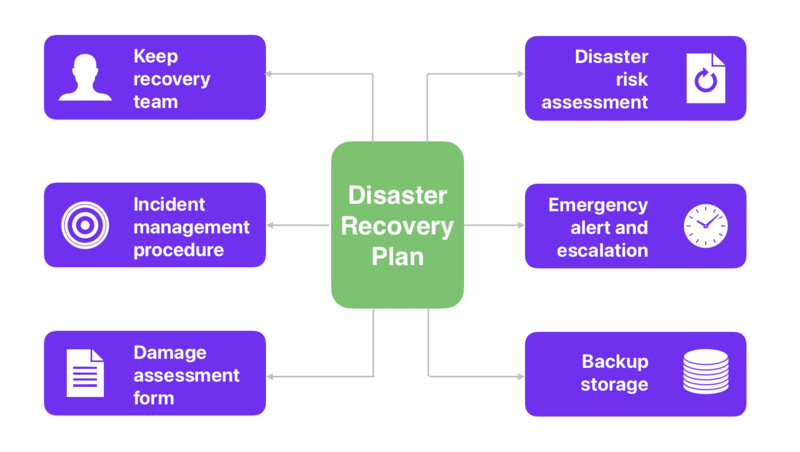
4. Robust backup & disaster recovery for Redmine
Data loss can be catastrophic. A secure cloud provider must have a comprehensive backup and disaster recovery plan. This means regular, automated backups of your data, stored in a separate, secure location. In the event of a system failure or an attack, this plan ensures that your data can be quickly and fully restored, minimizing downtime and business impact.
Here’s how to implement it effectively:
1. Regular backups
- Database Backups (PostgreSQL/MySQL): Daily automated dumps.
- File Backups: Attachments, plugins, and configuration files.
- Version Control: Backup repositories (if integrated with Git/SVN).
2. Backup storage & security
- Follow the 3-2-1 rule: 3 copies, 2 different media, 1 offsite (e.g., cloud/local/tape).
- Encrypt backups to protect sensitive data.
- Test restores periodically to ensure backups work.
3. Disaster recovery plan
- Recovery Time Objective (RTO): Define max downtime (e.g., 1 hour).
- Recovery Point Objective (RPO): Acceptable data loss (e.g., last 24h).
- Automated Failover: Use redundant servers or cloud backups for quick restoration.
4. High availability (HA) setup
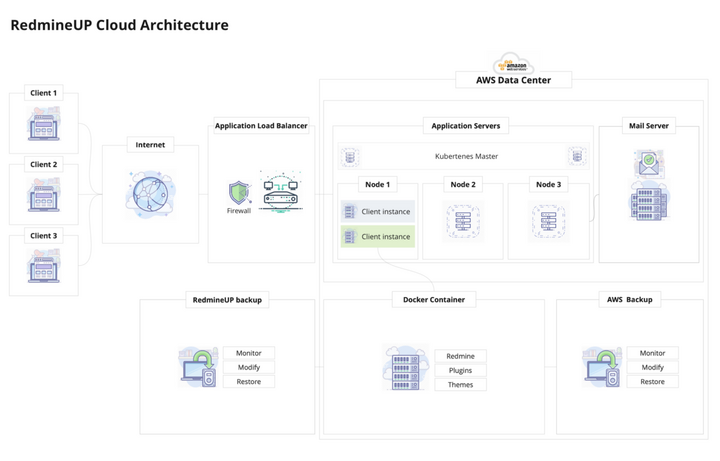
- Load balancing & clustering to minimize downtime.
- Containerization (Docker/Kubernetes) for easy redeployment.
5. Monitoring & alerts
- Track backup success/failure with tools like Prometheus, Nagios, or custom scripts.
- Get instant alerts for backup failures.
5. User access and identity management
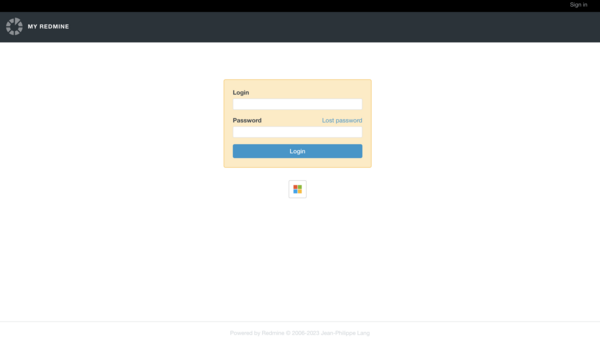
Security starts with who has access to your Redmine data. A good hosting provider will offer features for strong user access and identity management. This includes support for Single Sign-On (SSO), which simplifies access while maintaining control, and Multi-Factor Authentication (MFA), which adds an extra layer of security beyond just a password. These features prevent unauthorized access, even if a user's password is stolen.
We're currently running Redmine on our server. We're interested in migration to your web-hosted RedmineUP solution to benefit from reduced maintenance and dedicated technical support. Additionally, we utilize Single Sign-On (SSO) with Azure Active Directory (Azure AD) for automated user authentication. Etienne Brault, IT Supervisor
This guide will walk you through the steps to set up SSO with Azure AD and integrate it with Redmine. Once the configuration is complete, users will be able to use SSO to log into their Redmine accounts. By following these steps, you can easily set up SSO with Azure AD and integrate it with RedmineUP cloud account. This will provide secure access to Redmine accounts and make it easier for users to log in.
6. Transparent security policies and Service Level Agreements (SLAs)
While open-source Redmine offers valuable community support, it lacks dedicated professional assistance—which can be a challenge when you need reliable, timely solutions. To ensure smooth operations, consider outsourcing your Redmine management to experienced professionals who specialize in the platform.
Maintaining an in-house Redmine setup can strain your resources, both in time and cost. Outsourcing to experts allows you to maximize the platform’s potential without the overhead of hiring additional staff. However, when choosing a support provider, always insist on a Service Level Agreement (SLA). This guarantees clear performance standards and ensures you receive dependable assistance when it matters most.
George Baker, BI Analyst
G-Loot Convenience, support from RedmineUP team, features, custom plans — that is what made me feel certain it was the right choice. I am always looking out for tools that can help me manage the projects in an efficient manner without having to cost the business, huge amounts in return. After doing some research, I came across RedmineUP and after getting to know about the cool UI, exceptional DevOps services and economical service charges, we went for it right away
Finally, trust is built on transparency. A reputable Redmine cloud provider will have clear, easy-to-find security policies and a detailed Service Level Agreement (SLA). The security policy should outline their commitments to protecting your data, while the SLA should specify their guaranteed uptime and response times for security incidents. This transparency gives you peace of mind that your provider is accountable and dedicated to your security.
Demand clear commitments:
- 24/7 security monitoring
- Guaranteed uptime (99.9%+) in SLA
- Detailed incident reports
7. Patch management
Effective patch management is critical for maintaining a secure and compliant Redmine Cloud environment, especially under EU regulations like GDPR and NIS2. Unpatched vulnerabilities expose your system to exploits, data breaches, and compliance penalties.
Key Requirements for Redmine Cloud Patch Management:
- Automated Vulnerability Monitoring
- Timely Updates
- Plugin & Dependency Security
- Test patches in a staging environment before production rollout.
- Maintain patch logs (dates, versions, responsible admins).
- Emergency Rollback Plan
The Redmine upgrade process itself can be daunting, with a risk of downtime or unexpected issues. CTOs worry about disruptions to ongoing projects if the upgrade doesn't go smoothly.
However, with the right approach, you can upgrade Redmine: to the latest version smoothly and without downtime. In this Redmine upgrade guide, we'll walk you through a step-by-step process to ensure a seamless upgrade in 2025.

Redmine 6 in the Cloud
Migrating to the cloud doesn't have to mean sacrificing security. By using this checklist, you can confidently evaluate potential Redmine cloud providers and choose a solution that not only streamlines your operations but also ensures your business remains secure and compliant with EU regulations.
Using cloud-hosting services for Redmine has been a stable trend for the last few years. It helps you obtain both the great benefits of the flexible, open-source Redmine platform and eliminate its downsides, such as poor security, low usability and high maintenance costs.
Migrate to secure hosting
Don't waste your time on Redmine maintenance. Hire experts and focus on your projects
Redmine, while an open-source tool, requires server infrastructure and technical skills in Ruby and Linux to set up. This can be complex, making Redmine Cloud a more accessible option. Redmine Cloud offers a ready-to-use, stable version of Redmine, along with popular plugins. Instead of hiring Redmine experts, you can create a free cloud account to get started.
Dedicated Redmine hosting, such as RedmineUP Cloud, includes TLS/SSL encryption, daily backups, firewall management, load balancing, and independent, secure clusters. AWS infrastructure provides high availability and performance. Active Directory integration using SAML.