Picture a typical Monday status meeting. Your team has dozens of issues in Redmine, and every one of them has an owner and a due date.
.
Yet when the sponsor asks whether the release is still on track, the honest answer is "it depends". Task tracking tells you what each person is doing. It does not tell you whether the project as a whole will arrive on time.
- Task tracking vs. project planning in Redmine
- Redmine for project planning: what you get out of the box
- Where the Redmine Gantt chart stops
- Task dependencies: how one delay moves the whole project
- Critical path in Redmine: which tasks decide the finish date
- Project baselines: keeping plan execution measurable
- Collaborative project planning: review changes before they apply
- RedmineUP Planner: a Redmine Gantt alternative for project planning
- Make Gantt project planning part of your Redmine workflow
Task tracking vs. project planning in Redmine
Redmine is very good at the first job. Issues get assigned, statuses change, time is logged, and anyone can see who is responsible for what. For a small team with a short horizon, that is often enough.
As projects grow, a different set of questions appears, and the issue list cannot answer them:
- Are we actually on schedule?
- Which tasks are blocking progress?
- What happens if one team member misses a deadline?
- Will this delay affect the final release?
- Are we still following the original project plan?
Each of these is a question about relationships: what waits for a late task, how much slack the rest of the plan has, and how far the schedule has moved from the version everyone agreed to. Project progress tracking by issue status shows what is done. Project planning is what turns that into a delivery date you can defend. The sections below take the questions in turn.
Redmine for project planning: what you get out of the box
Before adding anything, it helps to be clear about what a standard Redmine installation already offers. It is more than many teams use:
- Dates and estimates on every issue, with parent and child tasks for breaking work down.
- Relations between issues. Precedes and follows relations say that one task cannot start before another ends, and a delay can be added. When the earlier issue moves later, Redmine pushes the following one with it.
- Versions with due dates, which work as release milestones and show progress on the roadmap.
- The Gantt chart, which draws issues and versions on a timeline and shows these relations as arrows.
- Saved queries and CSV export, which are enough for status reports and for a manual copy of the plan.
For a small team, this already works as Redmine for project planning. The gaps appear as the schedule grows. Redmine does not calculate a critical path (a request to show one on the Gantt chart has been open on redmine.org since 2013), it has no built-in way to keep the approved plan next to the current one, and every date change goes through the issue form.
Where the Redmine Gantt chart stops
The Gantt chart is the centre of that toolkit, and a Gantt chart for project planning has to do more than display dates.
The standard Gantt chart gives you a useful overview of issues, dates and relationships. However, it is not an interactive planning workspace: changing dates requires editing issues, while understanding the wider impact of a proposed change takes additional effort. A project manager moving a milestone by a week ends up opening a dozen issues, and reading dependencies across a long task list takes time. Two questions also stay open: which tasks decide the finish date, and how today's schedule compares with the one that was approved.
That is the difference between viewing a schedule and managing it. Viewing is a matter of display. Managing means being able to change the plan, see the consequences of the change and agree on it with the team. Planner brings schedule editing, dependency visibility and change review directly into the chart. That is the kind of Redmine Gantt alternative this article is about: a chart that stays inside Redmine but can be edited, not a separate tool.
It starts with a good overview. When owners, dates and durations sit on one project timeline, you can read the project at a glance instead of reconstructing it from issue lists. Here is a ten-task release plan in RedmineUP Planner, the plugin we come back to later in this article.
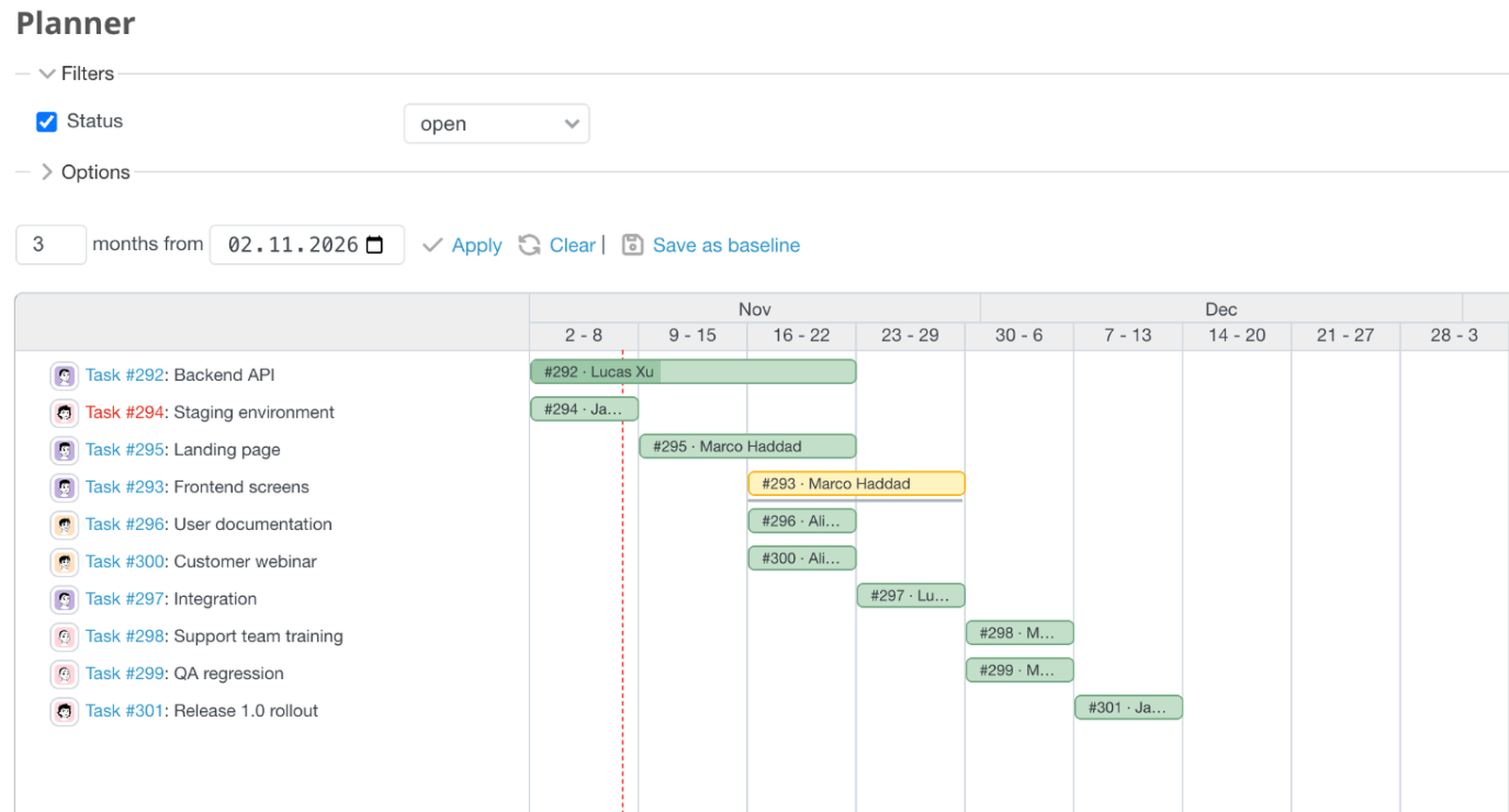
Get a clear overview of your project schedule, tasks and responsibilities in one Redmine Gantt chart.
Task dependencies: how one delay moves the whole project
Most project delays are not caused by one dramatic failure. They are caused by a small slip in a task that other tasks quietly depend on.
Take a common software release: Backend development → Integration → QA testing → Release. The backend work was planned for two weeks and takes three. Integration cannot start until the backend is done, so it moves. QA cannot begin until integration is complete, so it moves too. The release date, which was promised to a customer last month, moves with them. Nobody made a mistake after the first slip. The schedule simply did what dependencies make it do.
The damage is greatest when the slip is discovered late. If you only find out that integration is blocked when the backend developer reports "done" a week behind, the options are limited. If you can see the chain in advance, you can add a person, cut scope or reset expectations while it still costs little.
That is why a project manager should understand dependencies before changing a deadline or making a delivery commitment. Ask "what waits for this task?" every time a date moves. Redmine's relations let you record the answer, and a visual chart makes it quick to read.
In the screenshot below, the arrows connect each task to the ones that depend on it. One of them is drawn in red. Here the frontend screens are scheduled in a way that conflicts with the integration task that follows them. A conflict like that is easy to miss in a list and obvious on a timeline, so it can be fixed in a planning meeting rather than discovered in testing.
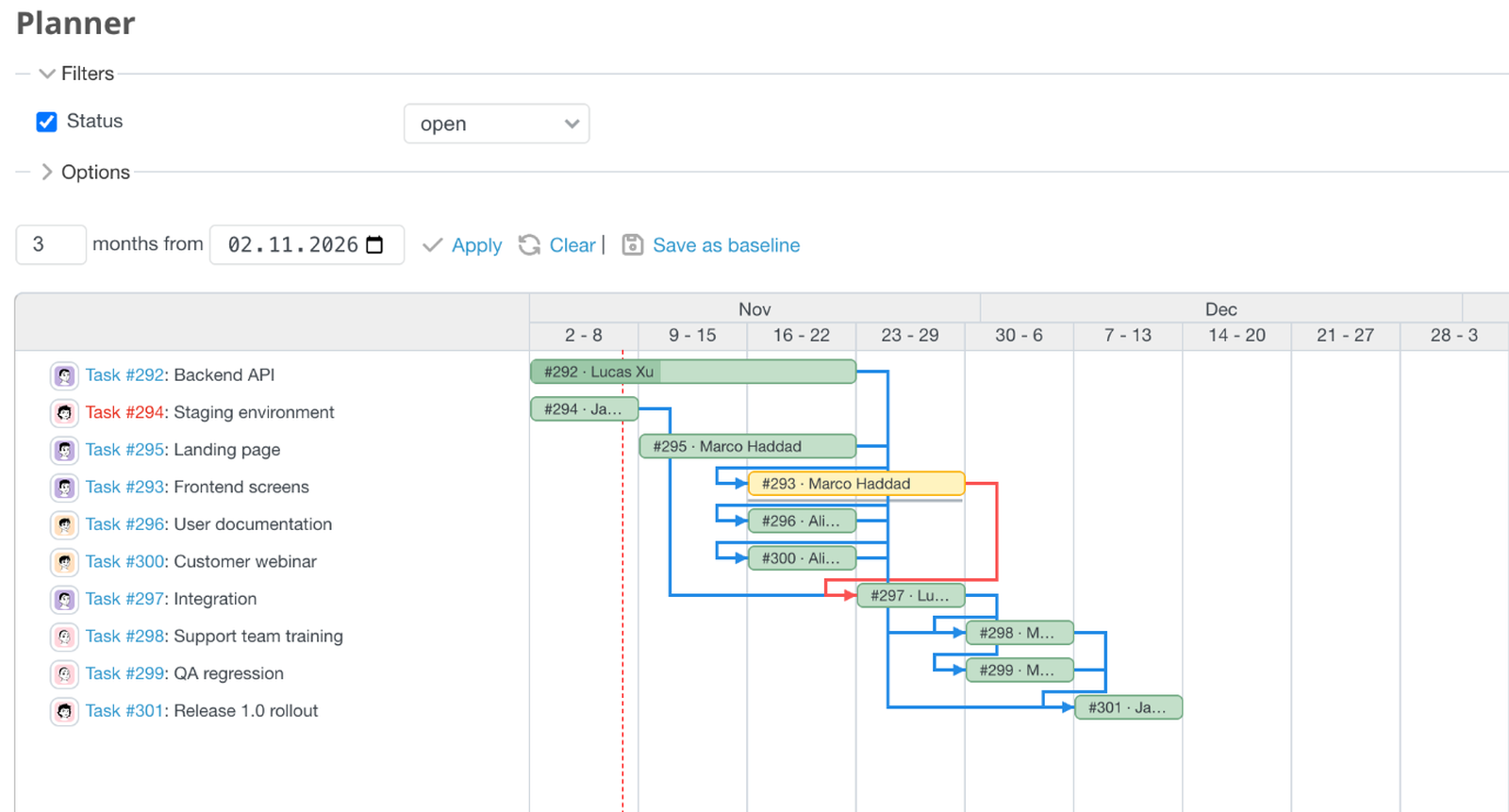
Understand how tasks depend on each other and identify scheduling conflicts before they affect project delivery.
Critical path in Redmine: which tasks decide the finish date
Once you can see dependencies, a second question comes up. If everything is connected, which delays matter most?
The answer comes from the critical path method (CPM), a standard technique in project scheduling. The critical path is the longest-duration sequence of dependent tasks that determines the earliest possible project finish. Tasks on this path have zero total float, meaning that a delay to one of them will push the project finish date unless the team takes action to recover the time. Tasks off the path have some room.
That room is called float, and it comes in two kinds:
- Total float is how long a task can slip without delaying the project's finish date.
- Free float is how long a task can slip without delaying the start of the task that follows it.
Float is counted in working days. A task with 12 days of total float can slip by 12 working days before the finish date is affected, as long as nothing else on its chain moves. A negative value means the plan as scheduled cannot meet its end date, or that a dependency is violated, for example when a task ends later than its successor allows.
Here is why this changes priorities. Imagine two issues, both marked "High" in Redmine. One is the integration work on the critical path. The other is setting up a staging environment that nothing urgent depends on. If integration slips by two days, the release moves by two days, unless the team recovers the time elsewhere. If the staging environment slips by a week, the release date does not change. Priority labels cannot tell you this, but the critical path can. Without it, teams tend to put their best people on the loudest tasks, or on the ones with the nearest due date, instead of the ones that control delivery.
Standard Redmine does not include critical path analysis, so many teams either skip the analysis or maintain it in a separate tool that falls out of date. In the screenshot, the critical chain is highlighted in red and every task carries a float value. Backend, integration, QA and the release sit at zero. The staging environment and the customer webinar have 12 working days of float. The frontend screens show a negative value: they end later than the task after them allows, the same conflict flagged in the previous screenshot, and it needs attention.
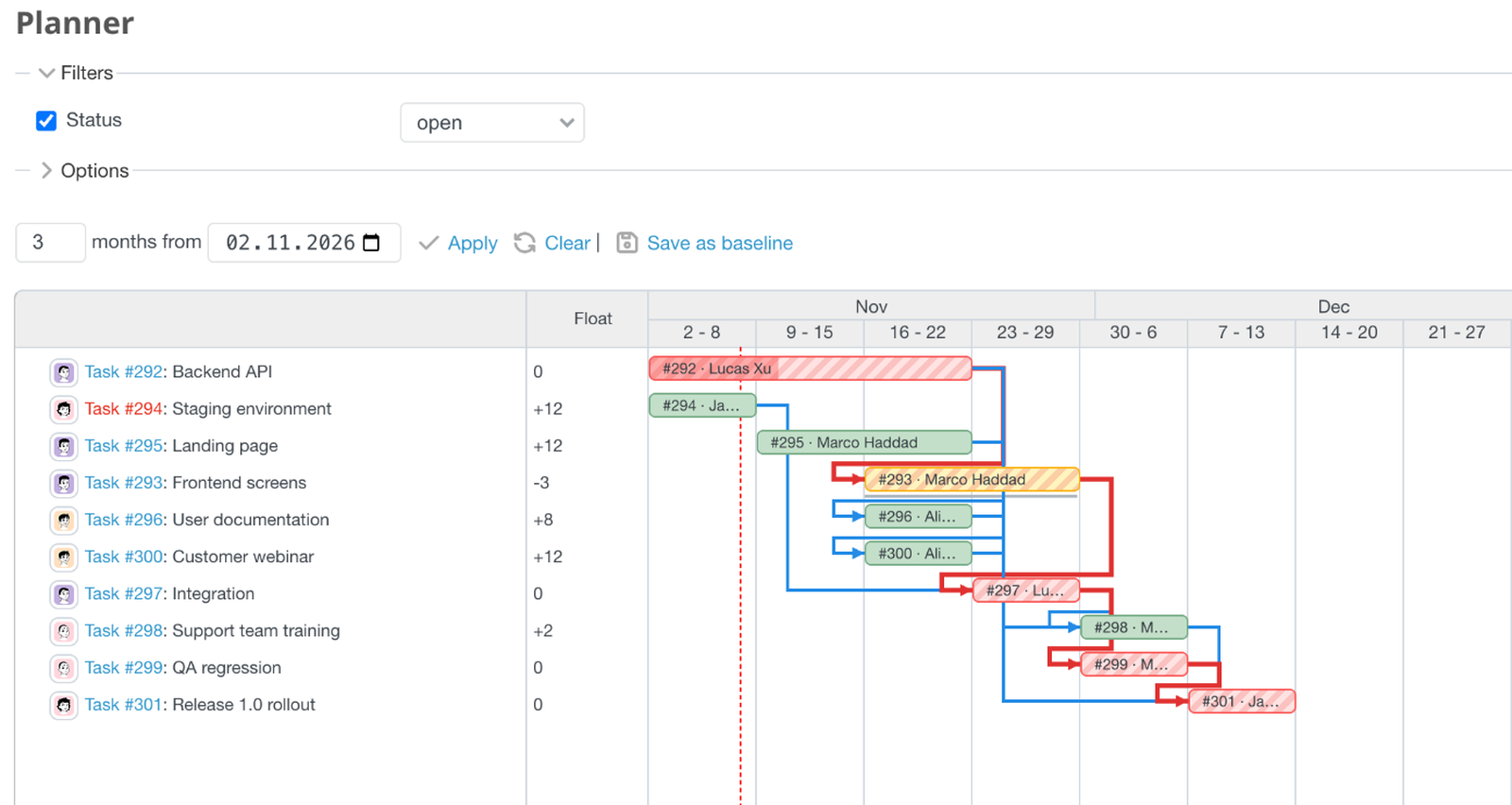
Identify critical tasks that directly affect your project completion date and focus team efforts where they matter most.
Project baselines: keeping plan execution measurable
Even a well-built plan has a shelf life. Requirements change, people get pulled onto other work, a vendor is late. Each change is small and reasonable, and each is made in its own issue, on its own day.
After a few months the original plan is gone. Nobody remembers what the approved dates were, and judging how plan execution is going becomes a matter of opinion. One person says the project is "about a week behind", another says "two", and a manager who has to explain to a customer why the delivery date moved has no clear way to show where the time went.
A project baseline fixes this. A baseline is a saved snapshot of the approved schedule. It records the planned start and due dates, not estimates, assignees or any other issue property. You keep it unchanged, and you compare the current schedule against it at any time. Instead of a vague feeling of drift, you get specific information: which tasks moved, in which direction and by how many days.
This brings three things teams usually lack:
- Accountability. The plan everyone committed to is on record and cannot be quietly rewritten.
- Realistic forecasting. A pattern of small slips in one area is an early signal, and it is more honest than adding "buffer" at the end.
- Transparent communication. "The release is four days later than the approved plan, and here are the three tasks that caused it" is a better conversation with a sponsor than "we hit some problems".
In the screenshot, the team saved a baseline called "Initial plan" at kickoff. A thin line under each bar marks the originally planned position, and a column shows how many working days each task has moved. The staging environment is exactly where it was planned. The landing page is five working days later, the frontend screens six, and the release rollout four. That is the real state of the project, in numbers, before anyone has to guess.
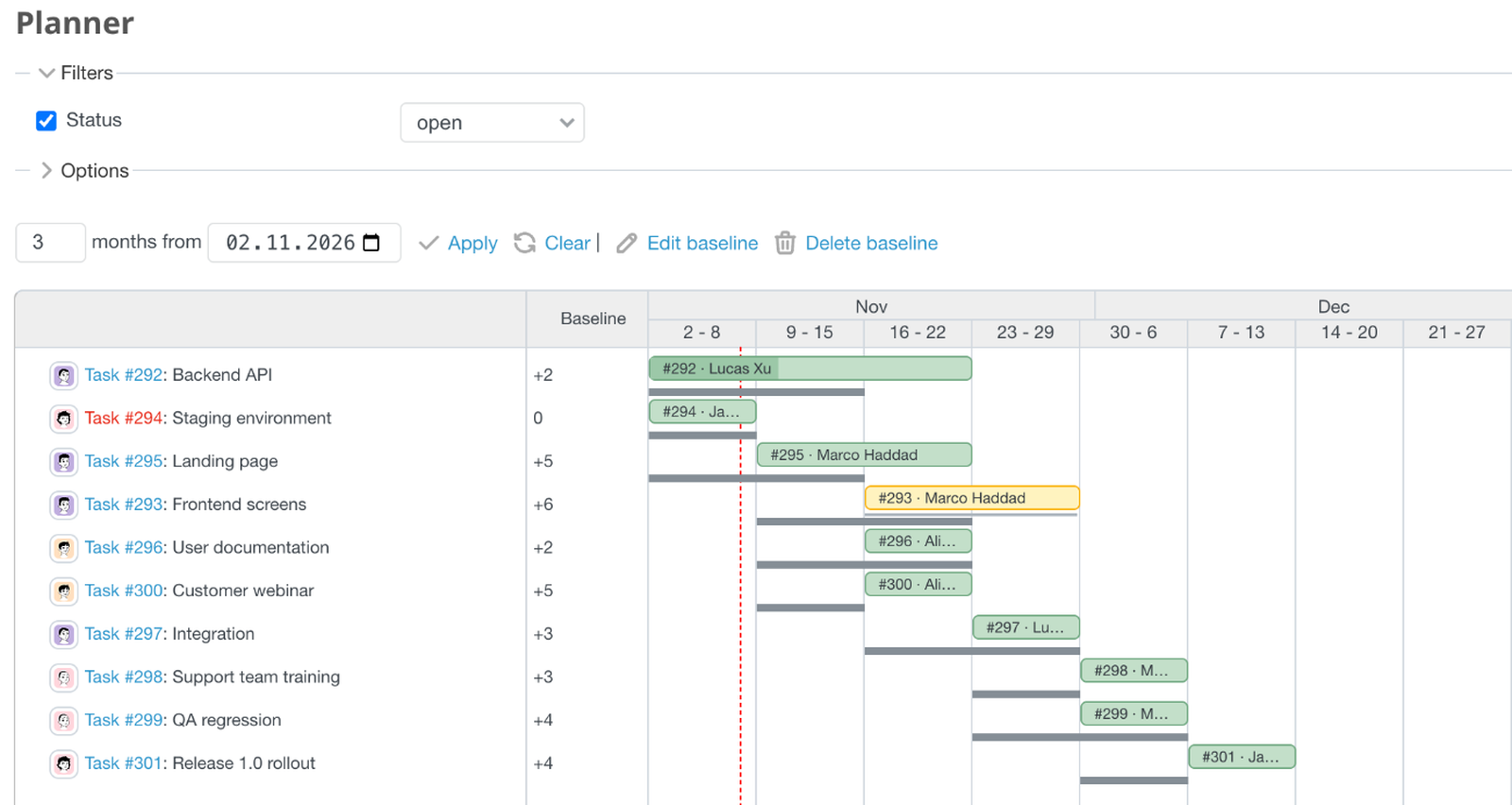
Compare your current project schedule with the original plan and identify delays before they become bigger problems.
Collaborative project planning: review changes before they apply
Planning is not something a project manager does alone, however neat the chart looks. A schedule change is rarely a private edit. When one task moves, the developer who owns it is affected, and so are the person who depends on it, the tester waiting for the build, and the team lead who allocated people to that week.
Yet in many teams, schedule changes happen as unannounced edits. Someone adjusts the dates, the notifications go out, and everyone else learns about the new plan from their inbox. That is a poor way to make a decision that touches several people.
A healthier habit has four parts:
- A change is proposed, not simply applied.
- The people it affects can see exactly what would change, including the knock-on effects on other tasks.
- The project manager reviews the consequences before approving.
- Only then does the new schedule become the working plan.
Teams that work this way spend less time on corrections and surprise reschedules. They also build a shared understanding of the current plan, which is worth a lot when people work in different time zones or on different projects.
The screenshot shows this idea in practice. Planner draws dependency arrows and highlights scheduling violations. When a proposed change affects successor issues, the Review table shows the resulting date changes before they are applied to Redmine. Here a proposed change to the frontend screens waits in a shared draft, with the old and new dates side by side and the author named. The dialog also notes that Redmine would move the integration task to the end of the month as a result. Nothing has been written to the real issues yet, and the team can decide what to apply.
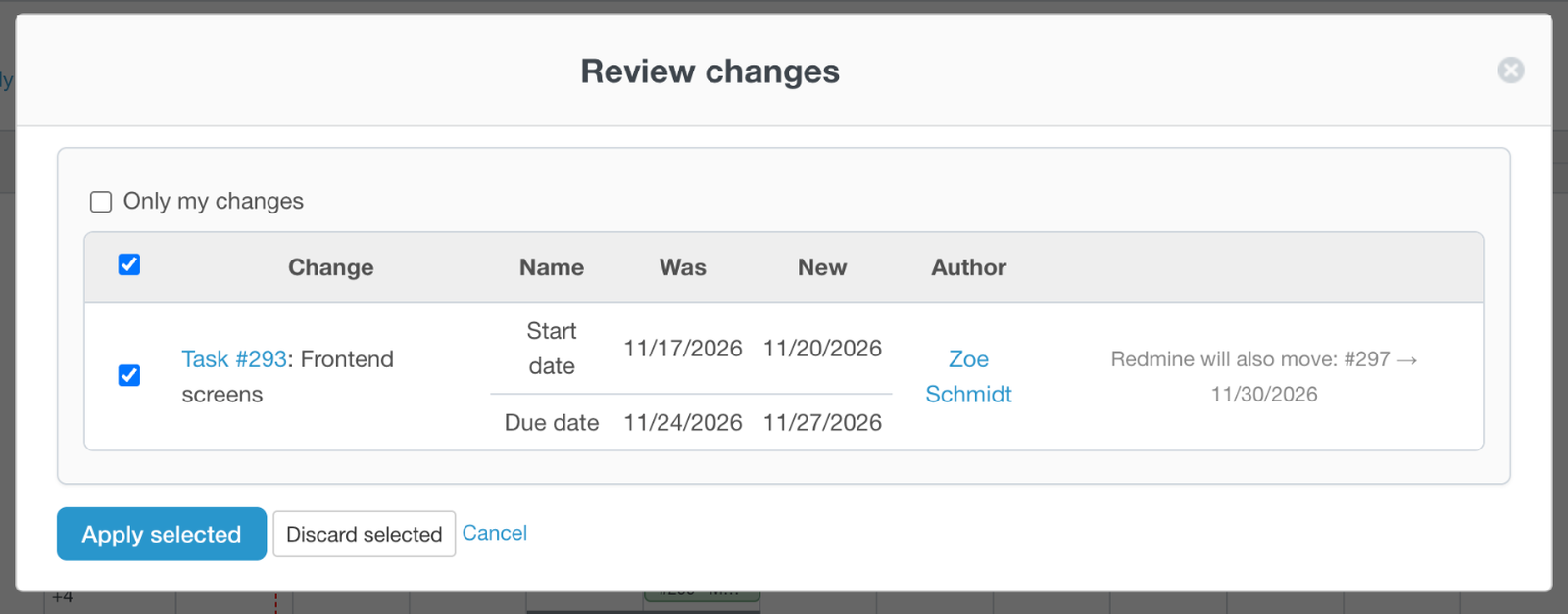
Review proposed schedule changes and their impact before applying them to your Redmine project.
RedmineUP Planner: a Redmine Gantt alternative for project planning
Everything above can be done with discipline, spreadsheets and a lot of patience. RedmineUP Planner is project planning software that brings these practices into one workflow inside Redmine, on top of the issues your team already works in. You plan on an editable Gantt chart where dependencies are drawn as arrows and violations are flagged. Proposed changes wait in a shared draft until someone reviews and applies them, and the critical path, baselines and version milestones sit on the same chart.
The practical gain is not any single feature. Schedule changes become easier to discuss, review and manage in one place, with Redmine remaining the source of truth for the work itself.
Planner combines the editable Gantt chart, the shared draft with Review and Apply, dependencies and Undo/Redo with advanced planning capabilities: critical path analysis with total and free float, baselines with the variance column, grouping, additional query columns, bar colors and version milestones. See the Planner page and the documentation for details.
Planner also works alongside the rest of the RedmineUP stack. Teams that run sprints can keep their boards in the Agile plugin, and managers who need to balance people across projects can add the Resources plugin. For a wider view of the options, see our guide to the best Redmine plugins for project management, or browse the full Redmine plugins directory.
Make Gantt project planning part of your Redmine workflow
Redmine is where your team already manages its work. With better planning practices, it can also be where you plan the schedule, understand dependencies and follow plan execution, without moving the plan into a separate tool that nobody updates.
If you want to start without installing anything, begin with a small habit. Pick one live project and ask the five questions from the start of this article. For each one you cannot answer from your current setup, you have found a gap in your project planning. That list is a good place to start the conversation about what your team needs next.
For teams who want to move beyond basic task tracking, RedmineUP Planner is the next step. Open the live demo, choose Planner and try the critical path, baselines and draft review on sample project data. When you are ready, install Planner on your own Redmine (5.0 to 7.0).