
Redmine itself serves as an excellent starting point for an IT team as a bug tracker. Beyond that, it can be expanded into a full project management tool, as it offers time tracking, Gantt charts to visualize progress, and a wiki for documentation.
.
Redmine itself serves as an excellent starting point for an IT team as a bug tracker. Beyond that, it can be expanded into a full project management tool, as it offers time tracking, Gantt charts to visualize progress, and a wiki for documentation.
The team most likely to adopt Redmine initially would be Support, thanks to features like the ability to reassign customer requests to colleagues and built-in email fetching. As its use proves effective, other departments within the company—such as HR, Marketing, and Finance—may also begin to consider implementing similar systems.
Given Redmine’s strong customization options and API, setting up tailored workflows can create a synergistic effect across teams.
We recently gathered candid feedback from users across roles—CEOs, system administrators, project managers, and developers—to understand what really moves the needle. Here are the top 5 Redmine plugins that our users say have genuinely transformed their workflows.
1. Agile Plugin – the heartbeat of modern teams
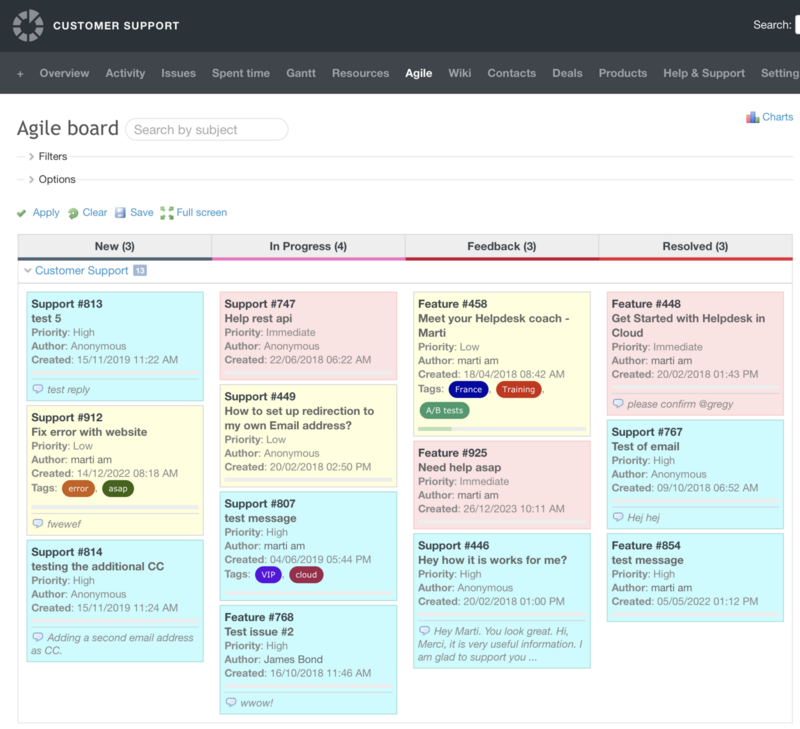
From sprint management and multi-project portfolios to visualizing intricate workflows, the Redmine Agile plugin, is a proven game-changer. Using the plugin, you can define a unique workflow for any project and build a customized Scrum or Kanban board. The best part? You can save your perfect board setup and instantly share it with your team for weekly syncs, planning meetings, and more.
Our platform is a customized Redmine to use for Business Strategy Development… my favorite plugin is the Agile plugin. It makes the strategy development come alive.
— Manny Palachuk, Owner & Head of IT
Agile board that work across many projects. It's the only reason we stay with Redmine.
— Pongtawat, Project Owner
While a traditional ticket list provides a static view of your project issues, a Kanban board offers a dynamic and visual representation that significantly enhances workflow management. You can select and arrange specific issue attributes to create a tailored view. This includes standard information like issue ID, subject, status, priority, and assigned user, as well as custom fields specific to your helpdesk needs. Clear visibility of the primary contact for the issue, streamlining communication and collaboration.
Why it matters: It turns Redmine from a static tracker into a dynamic, visual command center for Agile teams.
2. Helpdesk Plugin – seamless customer support
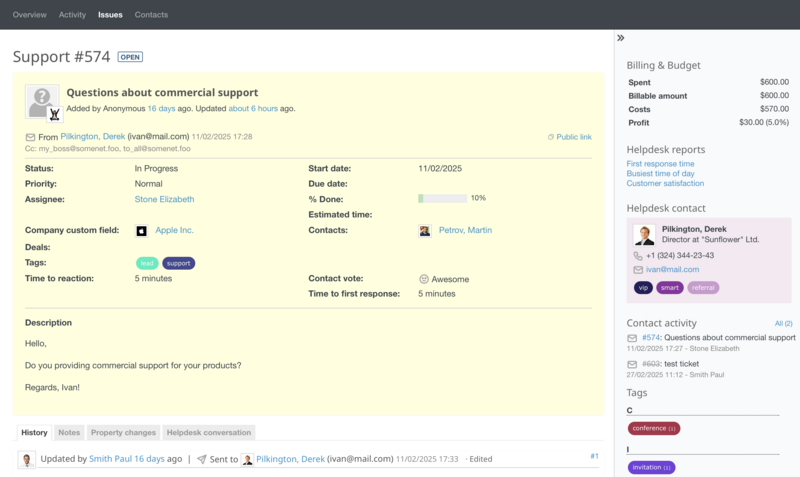
With the Redmine Helpdesk plugin, you get a range of insightful helpdesk metrics to track and scale team performance. You can regularly update and improve the knowledge base based on customer queries and update training materials based on emerging issues and trends.
I use Helpdesk. There is no Helpdesk functionality in the standard Redmine.
— Dimitar, Support Engineer
We have been able to discontinue using more expensive solutions like Zendesk.
— Duane Hughes, Senior DevOps Engineer
Why it matters: It bridges the gap between internal tracking and external communication, keeping everything in one place.
3. Checklists Plugin – never miss a step again
Sometimes the simplest tools make the biggest impact. The Checklist plugin is a perfect example—praised for bringing clarity, consistency, and compliance to everyday tasks.
Checklists ensured critical steps are never missed—whether it's safety checks before a field experiment or required documents for a reimbursement.
— Evgeny Khorov, Head of Wireless Networks Lab
The checklist functionality has been a game-changing addition to our processes.
— Gary Romero, Systems Administrator II
Teams use checklists for onboarding processes, quality gates, compliance workflows, and even as lightweight subtask replacements. It’s about reducing human error and ensuring repeatability.
Why it matters: It brings structure and accountability to complex or routine processes, right inside the ticket.
4. Tags Plugin – organize, filter, and find in seconds
Standard Redmine’s filtering can be limiting. Users consistently highlighted Tags and enhanced custom field management as essential for organizing large volumes of issues.
No tags for issues was a limitation. Now we use issue tags intensively—it definitely sped up issues search, relations, and grouping.
— Mikhail, CTO
By using Redmine Tags plugin, you can integrate the helpdesk with the software development team by providing them with a more personalised service using a customer-centric approach. Easily add, remove, and change tags assigned to an issue. Or merge a few into one with one click.
- Bug reports. Support teams often identify software bugs. Effective communication with development is essential for timely fixes.
- Feature requests. Customer feedback can lead to feature requests. Collaboration ensures these are prioritized and implemented.
- Technical issues. Complex technical problems may require joint troubleshooting efforts.
Why it matters: It makes Redmine scalable and adaptable to unique business logic without heavy customization.
5. CRM Plugin – keep your business relationships inside Redmine
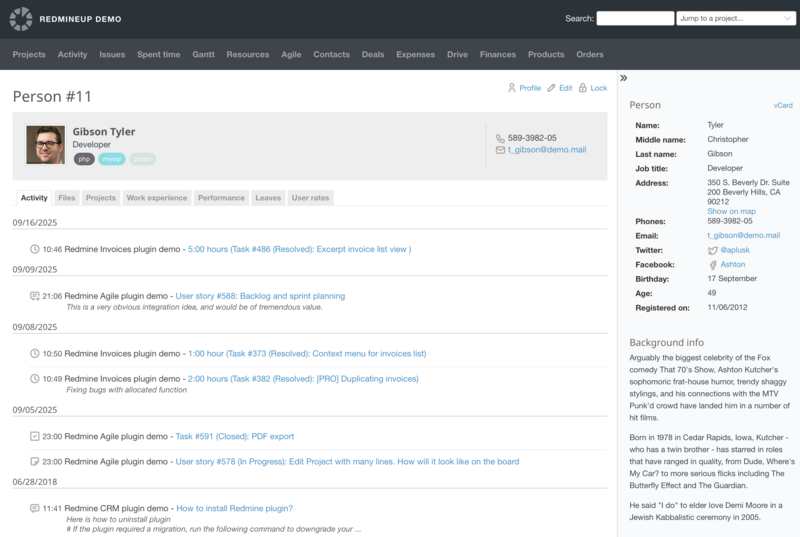
Why manage customers in a separate tool? Once you click on the customer profile, you will always be able to access the full history of communication and find the point of the last chat. The relevant information will help you prepare a tailored solution.
By using the Redmine CRM plugin, you can build strong personal relationships with your customers by providing them with a more personalised service using a value-centric approach.
CRM plugin saves using alternative software. Tracing contacts and budgets in one place is a time-saver.
— Solopreneur
We hooked up the Contacts plugin with our phone system. Now we see who calls.
— Josua Schmid, Software Engineer
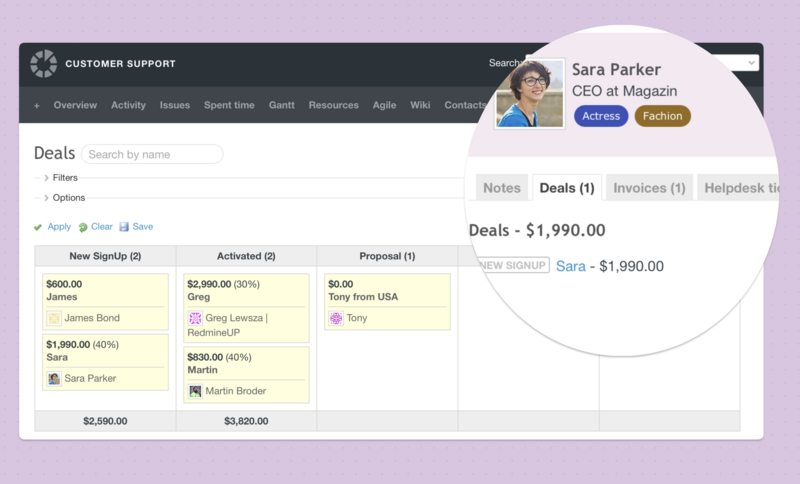
With the Redmine CRM plugin, you can access information about the contact you need. You will see all related information, such as background information, issues, orders, products, tickets, or projects in which contact is accessible.
- New customer inquiries. Support often fields initial customer inquiries that could be potential sales leads. Effective handoff processes are crucial.
- Product information. Sales teams may require detailed product information or troubleshooting guidance to address customer concerns.
- Contractual issues. Questions about billing, renewals, or upgrades often involve both sales and support.
Why it matters: It centralises relationship management, eliminating silos between support, sales, and project teams.
What Redmine users are saying about the bigger picture
Beyond specific features, a common theme emerged: integration and consistency.
RedmineUp plugins work together in symphony. If we did not have them, our productivity would be significantly lower.The entire set is awesome. Every time I found a shortcoming, RedmineUp always won due to quality of integration.
— Manny Palachuk
Users don’t just want a plugin—they want an ecosystem that grows with them, stays compatible through Redmine upgrades, and feels like a natural extension of the core system.
Ready to extend your Redmine?
The best Redmine plugins aren’t just about adding features—they’re about solving real workflow problems, saving time, and bringing clarity to your team’s processes.
Whether you’re looking to go Agile, improve customer support, enforce processes with checklists, organize with tags, or manage contacts—RedmineUP has a tested, trusted, and integrated solution.
Explore Redmine plugins today and see why thousands of teams choose RedmineUP to power their projects.