The code editor of the CMS plugin is built on CodeMirror 6. It highlights Liquid and HTML, has a search panel (Ctrl/Cmd+F) and completes Liquid as you type.
Autocomplete
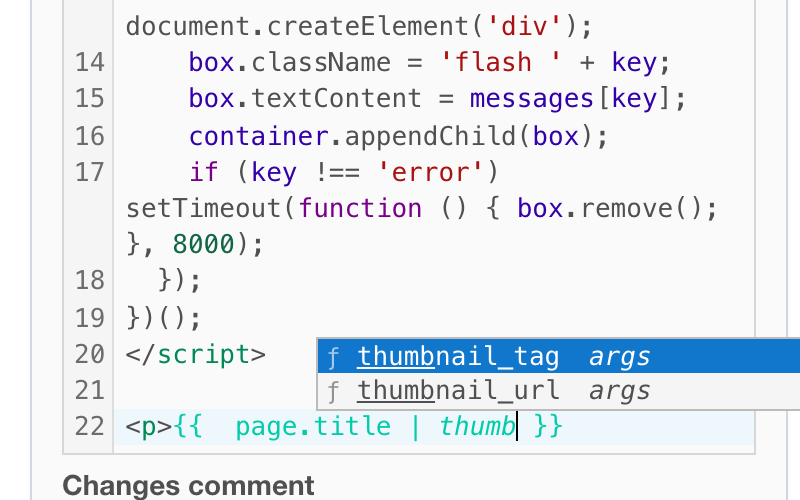
Suggestions come from the server, so they match your installation and the plugins you have.
| Where you type | What is suggested |
|---|---|
after {% |
Liquid tags; the matching end tag of the innermost open block (and its else, elsif, when branches) comes first |
| after the pipe character in an output or tag | Liquid filters; a filter with required arguments is inserted as name: |
after page., site., current_user. and similar |
fields of that object; relations such as page.parent. are followed |
a word inside {{ }} or {% %} |
variables, loop variables and names you defined with assign and capture |
inside render_snippet ', include_part ', pages[', page.fields[', page.attachments[' |
names of Snippets, Parts, Pages, Page fields and files |
Nothing is suggested inside a string. When you type } or %} over a closing bracket the editor inserted, the cursor moves past it.
Open a Snippet, Part or Page from the code
Hold Ctrl (Cmd on Mac) and click a name in render_snippet, include_part or pages['...']. The Snippet, Part or Page opens in a new tab.
Markdown filter
Besides Textile you can choose the Markdown Filter (CommonMark, GitHub flavored) for a Page, Part, Layout or Snippet. Liquid runs first, then the text is converted to HTML. The editor highlights Markdown too. On Redmine 5 the Markdown option appears only when the commonmarker gem is installed; Redmine 6 and 7 include it.
Useful shortcuts
| Shortcut | Action |
|---|---|
| Ctrl/Cmd+/ | comment or uncomment |
| Tab | expand an Emmet abbreviation, or indent |
| Ctrl-F11 or Shift+Ctrl+Enter | full screen (Escape leaves it) |
| Shift+Ctrl+W | toggle line wrapping |
| Shift+Ctrl+F | indent the selection |