- How languages work
- Choose the structure
- Build a German version step by step
- Translate the texts of layouts and snippets
- Add a language switcher
- How the language is chosen
- Caching
- Search engines
- How redmineup.com does it
- Pitfalls
- Related articles
The CMS plugin can serve the same Site in several languages. Every language is its own tree of Pages, the layouts and snippets are shared, and a language switcher moves the visitor between the translations. This article explains how the plugin chooses the language, how to build the translated trees, how to translate the texts inside layouts and snippets, and how to add a language switcher in the footer or as a select at the top. The examples follow the Site of redmineup.com, which runs in nine languages (English and eight translations).
How languages work
- Switch on Localization in the CMS general settings. The default language is the default language of Redmine (Administration, Settings, Display).
- The default language has plain addresses:
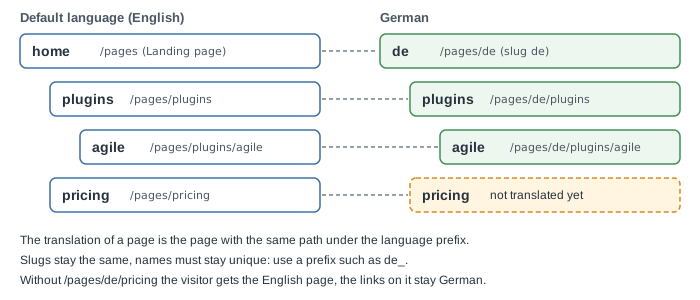
/pages/plugins. Every other language lives under its code:/pages/de/plugins. The home page of a language is the bare code:/pages/de. - There is no language field to fill in. The language of a Page comes from the first part of its address, and the Pages list can be filtered by Locale. The same value is returned as
localeby the REST API. - A translation is found by path: the German version of
/pages/plugins/agileis the Page at/pages/de/plugins/agile. There is no link table between the two, so the slugs of a translated tree must repeat the slugs of the default tree. - The language home Page is the translation of the Landing page. Create it as a Page with no parent and the slug equal to the language code.
- The language codes are the Redmine languages, in lower case:
de,es,fr,ja,ru,pt-br,zh,zh-twand so on. - A translated tree may have gaps. The tree of the default language is the complete one.
Choose the structure
| Approach | How it works | Use it when |
|---|---|---|
| A tree per language | Each language has its own Pages under its code. Texts of the pages are translated page by page. | Content that differs by language: product pages, articles, help, legal pages. This is what the plugin is built for. |
| Strings in shared layouts and snippets | One layout and the same snippets for all languages. The menu, footer and buttons pick their text by language while rendering. | The frame of the Site: navigation, footer, buttons, labels. |
| Text switched inside one Page | One Page with {% if site.language %} blocks. |
A landing with a few lines to translate, no more. Every new language means editing the Page itself. |
Most Sites combine the first two: the content in a tree per language, the frame in shared snippets with strings. Redmineup.com does exactly this (see below).
Build a German version step by step
- Open Administration, then CMS. Check that Localization is on and that the default language of Redmine is the language of your existing Pages.
- Create the language home. Add a new Page with the Name
de_homeand the Slugde, no Parent. Choose the Layout of your home Page and translate the Title and the content. It answers at/pages/deand is used as the translation of the Landing page. - Translate a Page. Open the English Page and press Duplicate. The copy gets the same attributes, Page fields and tags, and its Name ends with
_copy. Change the Name tode_plugins(names are unique on the whole Site), choose the German counterpart as the Parent (the Pagede_homefor a first-level Page), and keep the Slug and the Layout. Translate the Title, the content and the Page fields such as the description and the SEO title, then save. - Repeat for each Page. Keep the structure: if
pluginshasagilein English,de_pluginsgetsde_agilewith the slugagile. - Move the texts of your layouts and snippets into strings, as described below.
- Add the language switcher and the
hreflanglinks. - Check the result: filter the Pages list by Locale, open
/pages/deand a few translated addresses, and press the switcher to come back to the default language.
A Page that is not translated yet is not an error, see How the language is chosen below.
Translate the texts of layouts and snippets
The content of a Page is translated by its own German Page. A layout or a snippet is one object for all languages, so its texts are chosen while it is rendered. Two values tell the language:
page.localeis the language of the Page being shown (from its address).site.languageis the language of the visitor.site.default_languageis the default language of the Site.
They differ only when a Page has no translation: the English Page is shown to a German visitor, so page.locale is en and site.language is de. Redmineup.com uses page.locale for the texts of the menu and footer, so the frame of a Page always has the language of its content. Use site.language if you prefer the frame to follow the visitor.
One string per language. This is the technique of redmineup.com. Each language assigns one string with the items separated by | , the default language comes last as the fallback, and the string is split into a list. A language you did not write falls back to English.
{% assign ui = "" %}
{% if page.locale == 'de' %}
{% assign ui = "Alle Plugins | Preise | Hilfe" %}
{% elsif page.locale == 'es' %}
{% assign ui = "Todos los plugins | Precios | Ayuda" %}
{% endif %}
{% assign ui = ui | default: "All plugins | Pricing | Help" | split: " | " %}
<a href="{{ pages['plugins'] | page_url: 'localized:true' }}">{{ ui[0] }}</a>
<a href="{{ pages['pricing'] | page_url: 'localized:true' }}">{{ ui[1] }}</a>
<a href="{{ pages['help'] | page_url: 'localized:true' }}">{{ ui[2] }}</a>
Keep the items in the same order in every language: ui[1] must be the same word everywhere. Add a new string at the end of every list, never in the middle. Split a long list by area (menu, footer, buttons) into several snippets.
A condition for a few words. For one or two labels an inline condition is enough.
{% if site.language == 'de' %}Preise{% else %}Pricing{% endif %}
The sample site generated by rake redmine:cms:sample_site translates its snippets this way, with English and Spanish. See Try the sample site.
What is not translated by itself. Global variables hold one value, so keep the text that depends on the language in a snippet or in a Page field. The screens of Redmine outside the CMS keep the language of the Redmine user.
Add a language switcher
A switcher is a snippet that you show in the layout with render_snippet. Whatever its look, it follows the same rules:
- Show only the languages in which the current Page exists and is active.
in_localereturns the translation of a Page, and nothing when there is none, so the switcher never leads to an empty address. - Build the link with
page_urland the optionslocalized:trueandlocale:xx. - The link to the default language must carry
?locale=with its code. An address with no prefix takes the language from the session of the visitor, so without the parameter a German visitor would stay in German on the English Page.
Footer list. This is the switcher of redmineup.com without the flag icons. Put it in a snippet, for example language_switcher.
{% assign languages = "en:English, de:Deutsch, es:Español, fr:Français, ru:Русский" | split: ", " %}
<ul class="language-switcher">
{% for item in languages %}
  {% assign code = item | split: ':' | first %}
  {% assign name = item | split: ':' | last %}
  {% assign language_page = page | in_locale: code %}
  {% if language_page and language_page.active? %}
    {% assign locale_param = "locale:" | append: code %}
    <li>
      <a href="{{ page | page_url: 'localized:true', locale_param }}{% if code == site.default_language %}?locale={{ code }}{% endif %}"{% if code == page.locale %} aria-current="true"{% endif %}>{{ name }}</a>
    </li>
  {% endif %}
{% endfor %}
</ul>
A select at the top. The same loop builds the options of a select. A line of JavaScript opens the chosen address.
{% assign languages = "en:English, de:Deutsch, es:Español, fr:Français, ru:Русский" | split: ", " %}
<select class="language-select" aria-label="Language" onchange="window.location = this.value">
{% for item in languages %}
  {% assign code = item | split: ':' | first %}
  {% assign name = item | split: ':' | last %}
  {% assign language_page = page | in_locale: code %}
  {% if language_page and language_page.active? %}
    {% assign locale_param = "locale:" | append: code %}
    {% capture target %}{{ page | page_url: 'localized:true', locale_param }}{% if code == site.default_language %}?locale={{ code }}{% endif %}{% endcapture %}
    <option value="{{ target | strip }}"{% if code == page.locale %} selected{% endif %}>{{ name }}</option>
  {% endif %}
{% endfor %}
</select>
Then add the snippet where you want it: in the header of the layout for the select, in the footer for the list.
{% render_snippet 'language_switcher' %}
A logo link should lead to the home of the current language: use the tag home_path instead of a fixed address. It prints /pages/de for a German visitor and the usual home address in the default language.
<a href="{% home_path %}">Logo</a>
How the language is chosen
The language is chosen once for each request of a CMS Page, and the first rule that matches wins:
- the language code at the start of the address:
/pages/de/...or/pages/de; - the parameter
localeof the address:?locale=en; - the language saved in the session of the visitor, taken from the last visit that matched 1 or 2;
- the default language.
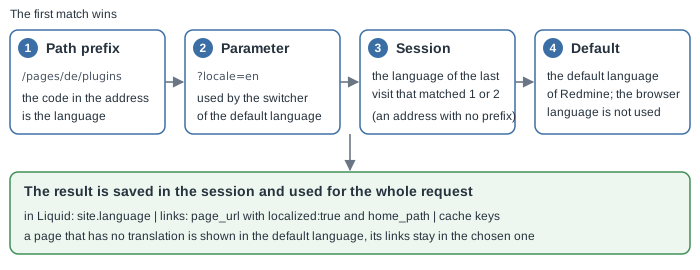
The choice is saved in the session and applies to the whole Site: once a visitor is in German, the links, the menu and the home link of every Page stay German. Three consequences are worth knowing:
- The language of the browser (the
Accept-Languageheader) is not used on CMS Pages, and the CMS does not redirect by it. Give the visitor a visible switcher. - An address with no prefix, for example the Landing page
/, shows the default language Page with the links in the language of the session. This is expected, not a bug. Only the switcher link with?locale=enreturns the visitor to the default language. - A visitor in a private window has no session and gets the default language.
Caching
The language is part of every cache key: the cache of Pages and Parts, the cache of the whole layout and the output of the cache tag. A page rendered for a German visitor can never be served in English, and the reverse. This means:
- You do not add the language to your own keys. A block inside
{% cache %}that prints a language switcher or a translated menu is cached once per language. - Saving a layout or a snippet refreshes the output of the Pages that use it in all languages. Refreshing the whole Site works for every language.
- Each translation is a separate Page with its own cache and its own history.
See Recommendations for a site structure for caching in general.
Search engines
Tell the search engines which Page is the translation of which. Redmineup.com does it in the head of the base layout: the language of the document, the canonical address and an alternate link for every language in which the Page exists.
<html lang="{{ page.locale }}">
<link rel="canonical" href="{{ page.fields['canonical'] | default: page_url }}">
{% assign locales = "en, de, es, fr, ru" | split: ", " %}
{% for locale in locales %}
  {% assign language_page = page | in_locale: locale %}
  {% if language_page %}
    {% assign locale_param = "locale:" | append: locale %}
    <link rel="alternate" hreflang="{{ locale }}" href="{{ page | page_url: 'localized:true', locale_param, 'absolute:true' }}">
    {% if locale == site.default_language %}<link rel="alternate" hreflang="x-default" href="{{ page | page_url: 'localized:true', locale_param, 'absolute:true' }}">{% endif %}
  {% endif %}
{% endfor %}
The files that the routes serve (robots.txt, sitemap.xml, llms.txt) are rendered in the default language and do not switch. Make one sitemap Page that lists the addresses of all the language trees you want to be indexed.
How redmineup.com does it
- English is the default language at
/pages/.... The other languages (German, Japanese, Spanish, Russian, French, Brazilian Portuguese, Polish and Chinese) live under/pages/de,/pages/jaand so on. Each translated Page has the Namede_...,es_...and the slug of the English Page. - There is one base layout and one set of snippets for all languages. The main menu and the footer choose their strings by
page.localewith the technique above and fall back to English. - The footer lists the languages in which the current Page exists and is active. The link to English carries
?locale=en. - The
headof the base layout printslang, the canonical address and thehreflanglinks.
Pitfalls
- A slug that is a language code. An address that starts with a language code is read as a language prefix. Do not name a first-level Page
de,esoritunless it is the home of that language. - Names clash. The Name of a Page is unique on the whole Site, the slug only inside one parent. Prefix the Names of a translated tree (
de_,es_). - Different slugs in a translation. Translations are matched by path. A German Page with another slug is not found as the translation of the English one, and the switcher will skip it.
- An address with a prefix and no Page is not found. Links built with
page_urlandlocalized:truefall back to the default-language Page, so keep every link in snippets built with that option and never write the addresses by hand. - The default-language link without
?locale=. A visitor with a German session stays in German. Always add the parameter to the link of the default language. - Strings out of order. The index of a string in the list must stay the same in all languages.
- The language you did not write falls back to English. Read your Site in each language before you publish the new one.
- robots.txt, sitemap.xml and llms.txt are not translated: the Page of a route renders in the default language.