- Names and addresses
- Layouts
- Snippet, Part or Page field
- Caching
- Special pages, routes and menus
- Safe editing
- Several languages
- Related articles
These recommendations come from how the plugin works and from the sample site. Follow them when you plan a Site, and most of the later changes stay small.
Names and addresses
- Name is unique on the whole Site, slug only inside one parent. Both use letters, digits,
-and_, and a value that is only digits is refused. Give names a prefix by area (for example help_ or es_) so that two sections never clash. - The address of a Page is its slug and the slugs of its parents, so the tree is your URL structure. Plan it before you create Pages.
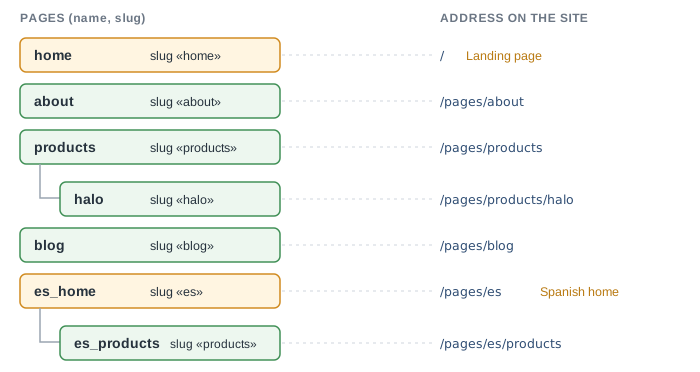
- Keep the slug short and stable. Moving a Page under another parent changes its address.
Layouts
- Use one Layout per kind of content:
mainfor ordinary Pages, a second one for articles, and one per file type (a stylesheet, a script,sitemap.xml, plain text). Set the Content-Type of the Layout to match. - Put the header, the footer and the menu in Snippets and render them from every HTML Layout, so that the Layouts share them.
- Keep a Layout free of page-specific text. What differs between Pages belongs in the Page, in its Parts or in its Page fields.
Snippet, Part or Page field
- A block used on many pages is a Snippet. A block of one Page is a Part. See Snippet or part.
- Store data in Page fields (a price, an author, a picture name) and let a list Page read them with
pages,where_fieldandgroup_by_field. Then adding a product or an article is a new Page and no template changes. - Pass the Snippet name as a literal. The Used in tab finds only literal names, so a name built from a variable is invisible to it.
Caching
- Turn Cached on for public pages that look the same for everyone. Keep it off for pages that list other pages (a blog index, a sitemap): the cache key of a Page knows only that Page.
- Saving a Snippet or a Layout is enough to show the change. You do not need Refresh cache for them.
- The setting Layout caching caches the frame of every cached Page for each user separately. Switch it on when many visitors open the same Pages.
- Choose Cache expires in by how fresh a Page must be. The default is 15 minutes.
Special pages, routes and menus
- Choose a Landing page and an Error page in the settings, so that the Site home and the errors use your Layout.
- Use Routes for fixed paths such as
/robots.txt,/sitemap.xmland/llms.txt. A route to a Page needs an Active, public Page with a Layout. - Use Menus for items of the Redmine top menu. Use a Snippet for the menu inside your own Layout.
Safe editing
- New Pages are Locked until you set Active. Build a Page as Locked, check it with Preview, then switch it on. See Preview unsaved content.
- Write a Changes comment when you save. It appears in the history, see History and comparing versions.
- Export the Site before large changes: Export website in the CMS settings saves Pages, Layouts, Snippets, files and Global variables to a file, and Import website loads such a file back. Menus, Routes, Action layouts, the history and the other settings are not in the file: note them separately.
- Give editing rights through Edit permissions to a group, not to a long list of administrators.
Several languages
- Switch on Localization. Keep one tree per language and share the structure: the same Layouts and Snippets, with text chosen by
site.language. The sample site keeps English at the root and Spanish under a root Page with the sluges. Step by step, with the language switcher, strings and caching: Build a multilingual site.