- Turn it on
- The scope
- How it is calculated
- Total float and free float
- Worked example
- Delay
- Negative float
- Reading the Float column
- Parent tasks
- Float of an issue
- When the path cannot be calculated
- Related articles
PRO The critical path is the chain of dependent issues that decides when the work ends. If an issue on the path slips by a day, the end slips by a day. Planner finds the path and shows, for every issue, how much it may slip.
Turn it on
- Open the project page of Planner. The critical path is not available on the global page.
- Select Options.
- In Critical path choose Project end or one of the open versions.
- Select Apply.
The list holds none, Project end and every open version that has a date and open issues in the scope. Your choice is remembered per project. The Float column appears at the end of the task table.
What you see:
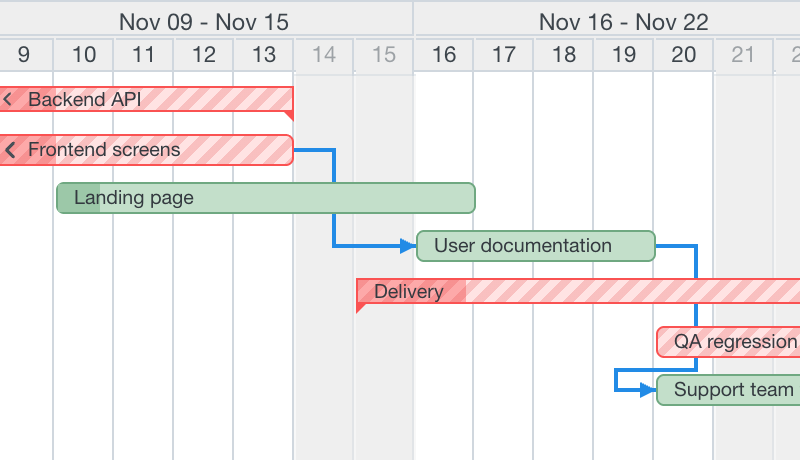
- A critical bar has pale red hatching. A critical bar without a Draft change is also red; a Draft one stays yellow under the hatching.
- The dependencies on the path are red and 3 pixels thick.
- The Color by option is set to none while the path is on.
- The tooltip of a bar has a section with Total float and Free float.
The scope
The path is calculated for all issues of the project and its subprojects, whatever the filters on the chart say: filters only hide rows. Your Draft is included: dates are taken as shown on the chart, the Draft value if there is one. Moving a bar, undoing or creating a dependency recalculates the path at once in the browser.
Closed issues are not part of the calculation, nor are their dependencies: finished work cannot slip. An open issue at 100% done is an ordinary node. At most 20,000 open issues with dates are calculated; above that you get a warning instead of a result.
How it is calculated
Planner uses the classic critical path method on working days (see Working days).
- Forward. The early dates are simply the dates of the issues as scheduled (Draft or Redmine). Planner does not move anything.
- End. Project end is the latest due date of the open issues in the scope. A version is a deadline: its due date.
- Backward. From the end, Planner computes for every issue the latest finish that still keeps the end: the late finish of an issue is the smallest of (late start of each successor - 1 working day - delay).
- Total float = late finish - due date, in working days.
- Free float = start of the nearest successor - due date - 1 working day - delay. It is limited by the total float.
- An issue is critical when its total float is 0 or less.
Total float and free float
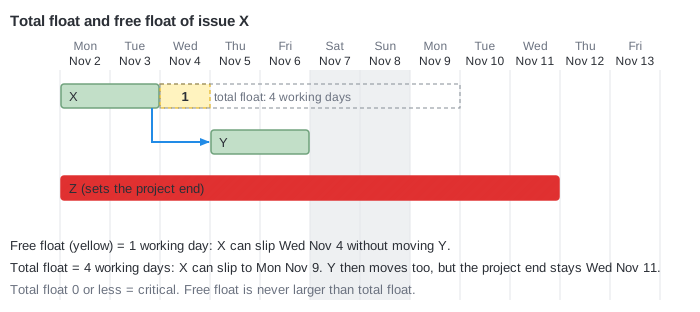
Total float is the room an issue has before the project end moves. Free float is the room it has before its next issue has to move. In the picture issue X may slip by 4 working days in total, but only by 1 before Y has to move.
Worked example
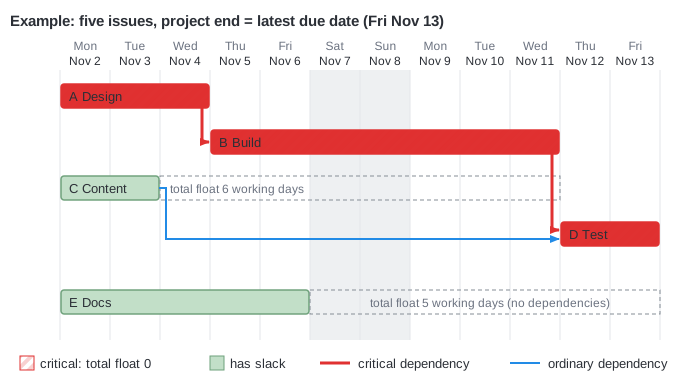
Five issues, weekend skipped. A (Design) feeds B (Build), B and C (Content) feed D (Test), E (Docs) stands alone. Working days are numbered from Monday, November 2.
| Issue | Dates | Working days | Late finish | Total float | Free float |
|---|---|---|---|---|---|
| A Design | Mon Nov 2 - Wed Nov 4 | 3 | Wed Nov 4 | 0 | 0 |
| B Build | Thu Nov 5 - Wed Nov 11 | 5 | Wed Nov 11 | 0 | 0 |
| C Content | Mon Nov 2 - Tue Nov 3 | 2 | Wed Nov 11 | 6 | 6 |
| D Test | Thu Nov 12 - Fri Nov 13 | 2 | Fri Nov 13 | 0 | 0 |
| E Docs | Mon Nov 2 - Fri Nov 6 | 5 | Fri Nov 13 | 5 | 5 |
- The project end is the latest due date: Friday, November 13 (D).
- D has no successors, so it must finish on November 13: total float 0.
- B precedes D. D starts at the latest on Thursday, November 12, so B must finish by Wednesday, November 11, which is its due date: float 0.
- A precedes B in the same way: float 0.
- C also precedes D, so its late finish is Wednesday, November 11. C ends on Tuesday, November 3. Between them are Wednesday 4, Thursday 5, Friday 6, Monday 9, Tuesday 10 and Wednesday 11: 6 working days of float. The weekend is not counted.
- E has no dependencies at all, so only the project end limits it: Friday, November 6 to Friday, November 13 is 5 working days.
The critical path is A, B, D (A to B and B to D are the red arrows). C and E have slack.
Delay
The delay of a dependency (working days) is counted like Redmine does. If the dependency from C to D had a delay of 6 working days, C could not slip at all: its float would drop from 6 to 0 and C would become critical. Delays come from the relations in Redmine; Planner creates new dependencies with delay 0.
Negative float
Float below zero means the plan cannot meet the end.
- A version as the end. A version is a deadline for all its issues and all their predecessors (transitively). If the version in the example is due on Tuesday, November 10 and contains D, D has a total float of -3, A and B too, and C has 3. E is not a predecessor of the version, so it has no float.
- A violation. If D is moved to Tuesday, November 10, while B still ends on Wednesday, November 11, B gets a free float of -2: it ends two working days later than its successor allows. The arrow is red as a violation.
When the end is a version, its diamond on the chart is red.
Reading the Float column
The Float column shows the total float as +N, 0 or -N in plain text, and the tooltip has both floats. Use it to sort out what to protect: zero or negative needs attention, a large number is room to move people.
Parent tasks
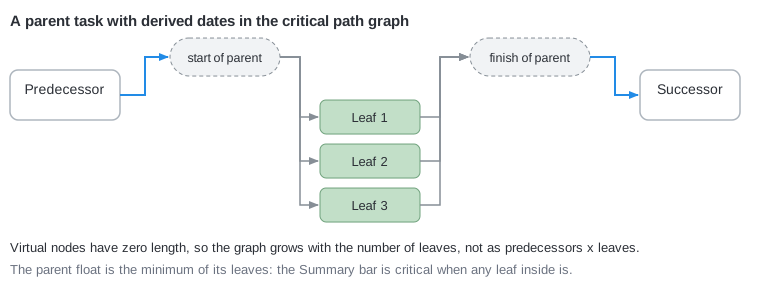
A parent with calculated dates is not a node of its own in the graph. Its dependencies are moved to its open subtasks through two virtual points of zero length, the start and the finish of the parent. The float of the parent is the minimum of its subtasks, so a Summary bar is critical when any subtask inside is. A parent with independent dates is an ordinary issue.
Float of an issue
- Issues with dates but without dependencies are ordinary nodes: their float is the project end minus their due date.
- Issues without dates and without dependencies are left out; their cell stays empty.
When the path cannot be calculated
Planner then shows no highlight, leaves the Float cells empty and puts a message above the chart that names the issues with links:
- Critical path cannot be computed: issues without dates in a dependency chain. Give the issues a start and a due date, or remove the dependency.
- Critical path cannot be computed: dependency cycle. Remove one dependency of the cycle.
- Critical path cannot be computed: more than 20000 issues with dates. Narrow the project scope.