In this article, we will show you how to print the Closed and Opened Issues using the Reporter plugin.
Let's take a look at the following Issues list.
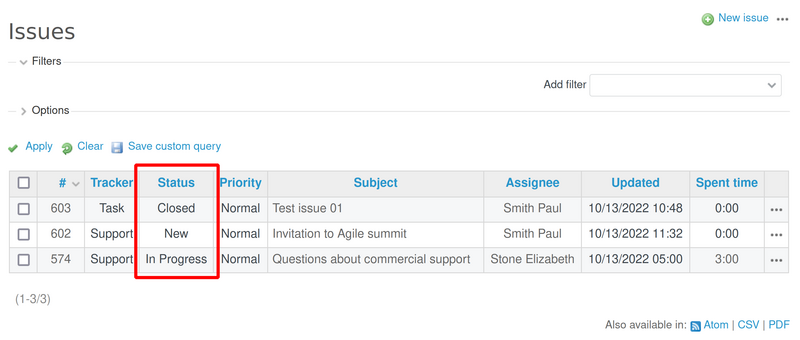
We got 2 open (with statuses "New" and "In progress") and 1 closed (with the status "closed") issue.
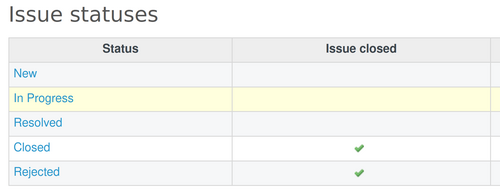
Important: If you would like to know which statuses are Open and which are Closed, then you have to go to Administration - Issues statuses. And then the ones with the option Issue closed are Closed and the others are Open. You may check the below picture for making the situation more clear.
Ok, so we could print the open and closed Issues and the result could be this one.
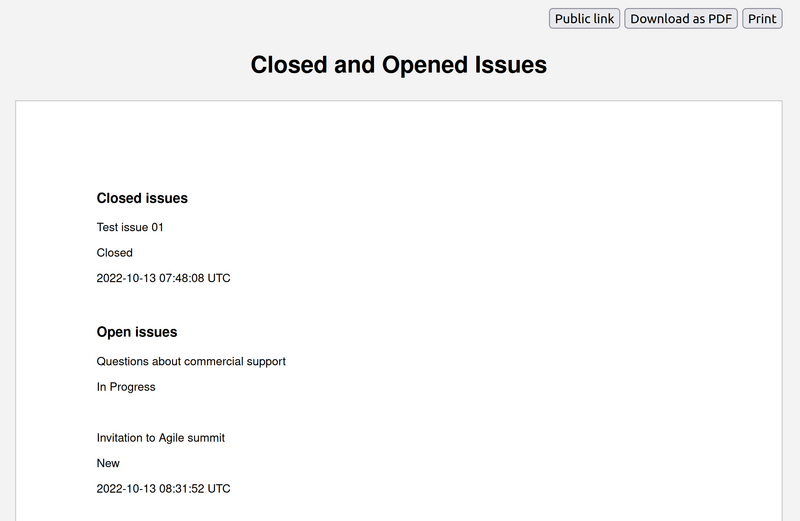
The code for the report template used for this example could be taken below:
<div>
<h3>Closed issues</h3>
{% assign select_issues = issues.all | where: 'closed?', true, '==' %}
{% for issue in select_issues %}
        <p>{{issue.subject}}</p>
        <p>{{issue.status}}</p>
        <p>{{issue.closed_on}}</p>
        <br>
{% endfor %}
</div>

<div>
<h3>Open issues</h3>
{% assign select_issues = issues.all | where: 'closed?', false, '==' %}
{% for issue in select_issues %}
        <p>{{issue.subject}}</p>
        <p>{{issue.status}}</p>
        <p>{{issue.closed_on}}</p>
        <br>
{% endfor %}
</div>