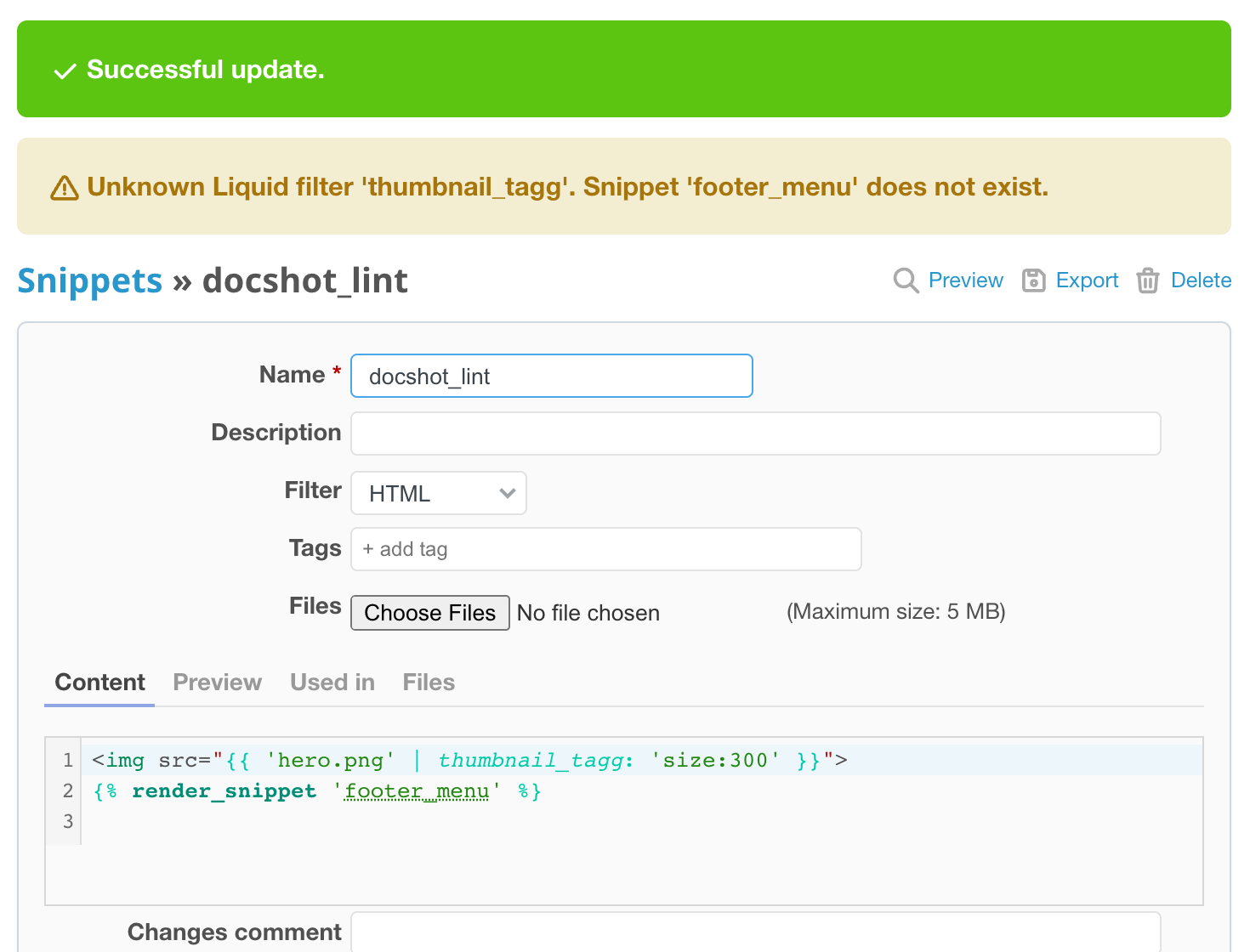
Liquid fails quietly: a mistyped filter or a missing Snippet prints nothing. After you save a Page, Part, Layout or Snippet, the CMS plugin checks the content and shows warnings in a yellow message next to the "saved" notice. Saving is never blocked, so you can keep unfinished work.
What is checked
- Syntax. A Liquid syntax error is shown alone, with the Liquid message ("Liquid syntax error: ...").
- Unknown filter. A name after
|in an output that Liquid does not know, for examplethumbnail_tagg("Unknown Liquid filter 'name'."). - Missing Snippet. A
render_snippetwith a literal name that does not exist ("Snippet 'name' does not exist."). - Missing file. A file named in a file filter such as
thumbnail_tag,thumbnail_url,image_tagorattachment_url, or inrender_file, that is not attached to the Page (or to the Layout or Snippet) ("File 'name' is not attached.").
At most five warnings are shown; a name is reported once. File names of the form page_name:file are looked up on that Page, and :file among the Site assets.
What is not checked
Names built from variables, filters used only inside {% %} tags such as assign, Page fields, imports, restoring a version, Menus, Variables and Routes. Warnings are not part of REST API responses.
The preview shows the same warnings before you save: see Preview unsaved content.