The Draft is the heart of Planner. It holds proposed changes of dates, estimates, assignees and dependencies and keeps them apart from your real issues until you decide.
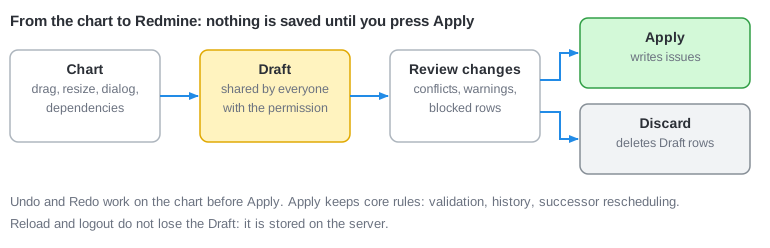
How the Draft works
- One Draft change exists per issue (and per dependency). It has no owner and no project: everyone with Edit planner draft in the issue's project sees and edits the same proposal, on the project page, the parent project page or the global page. The last write wins.
- The Draft is stored in the database. You can close the browser and come back.
- A value equal to the current issue value is dropped, and a change with nothing left is deleted. The Draft never contains no-op changes.
- A proposed dependency is accepted only if Redmine itself would accept the relation: no relation to itself, none between a parent and its child, no cycle with the existing relations, same project unless cross-project relations are allowed. Otherwise a message is shown above the chart and nothing is stored.
- Cycles that exist only between proposed dependencies are found at Apply.
Review changes
The Review changes button (top right, with the number of Draft changes) opens a table with a row for every change: the issue (or "#A precedes #B"), the field, the old and the new value, the author and a message. Use Only my changes to filter and the check box in the header to select all.
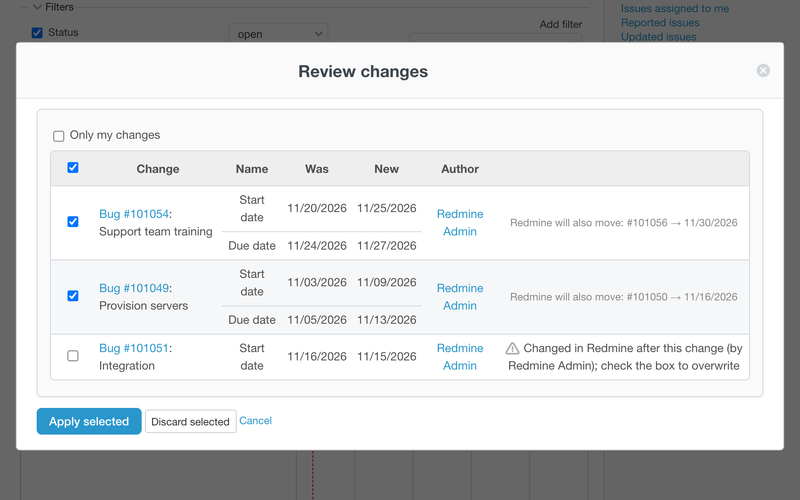
The scope is the page you are on, independent of the current filter: on a project page all Draft changes of the project and its subprojects, on the global page everything you can see.
Every row has one of three states:
| State | Meaning |
|---|---|
| Ready (checked) | Can be applied. A warning lists what Redmine will additionally move: "Redmine will also move: #12". |
| Conflict (unchecked) | The issue was changed in Redmine after the Draft change was made, by the user named in the message. Select the check box to overwrite their change. |
| Blocked (disabled) | You lack the core permission for this row, for example Edit issues. The message is "You cannot apply this change". |
Apply
- Check the rows you want and select Apply selected.
- Planner writes in this order: removed dependencies, issues, then added dependencies. All of it is one transaction.
- On success the applied rows leave the Draft and the page reloads, keeping the query.
If one row fails validation, a permission or a conflict check, the whole transaction is rolled back and the table is shown again with the error in that row. Fix or uncheck it and apply again.
Issue changes go through the normal issue save: Redmine validation, the issue history (you are the author of the journal), notifications and callbacks. For dates this means:
- Redmine does not allow a successor to start before its predecessor allows. The warning in Review tells you what it will move.
- Parents whose dates are calculated from subtasks are recalculated by Redmine.
- Successors are rescheduled by Redmine when a predecessor moves forward, in working days.
Dependent rows are not selected automatically. If you apply a successor without its predecessor, Redmine may refuse it. Select related rows together.
Discard
Discard selected deletes the chosen Draft rows after a confirmation. Issues are untouched. Applying or discarding from any page clears the change for everybody.