Planner counts dates the way Redmine does. This article explains which days are skipped, how a successor's earliest start is found and why the numbers of the critical path are in working days.
Which days are working days
The working week is defined in Redmine: Administration, Settings, Issue tracking, Non-working days. By default Saturday and Sunday are non-working. Planner reads the same setting, so changing it changes the shading of the chart, the violations and the float values at once. There is no setting in Planner itself.
- The chart shades non-working days at the Days scale.
- Holidays and absences are not taken into account: only weekly non-working days. A public holiday on Wednesday counts as a working day.
The rule for a successor
The earliest day a successor may start is calculated by Redmine, and Planner repeats the same rule in the browser:
earliest start = predecessor due date + 1 working day + delay (working days)
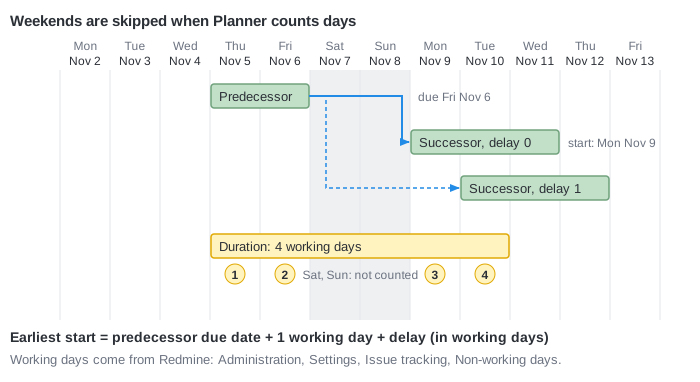
- Predecessor due Friday, delay 0: the successor starts on Monday (Saturday and Sunday are skipped).
- Same predecessor, delay 1: the successor starts on Tuesday.
- Predecessor due Wednesday, delay 0: the successor starts on Thursday.
Duration
The duration of an issue is the number of working days from the start to the due date, both included. An issue from Thursday to the next Tuesday takes four working days: Thursday, Friday, Monday, Tuesday. Float and variance are measured in the same working days, so a weekend between two dates is never counted.
When Redmine reschedules successors at Apply, it keeps their durations.
Why this matters
The same plan on a seven-day week would show other numbers. In the example of Critical path and float issue C has 6 days of float with a normal week and 8 if Saturday and Sunday are working. If your team works on Saturday, remove it from the non-working days, otherwise the plan is too pessimistic.