
PRO version. Select exactly one sprint in the Sprint filter and the Burndown, Burnup and Velocity charts switch from "the state as it is now" to "the state as it was on each day", built from the issue history. With no sprint or several sprints selected, these charts work as described in Agile Charts.
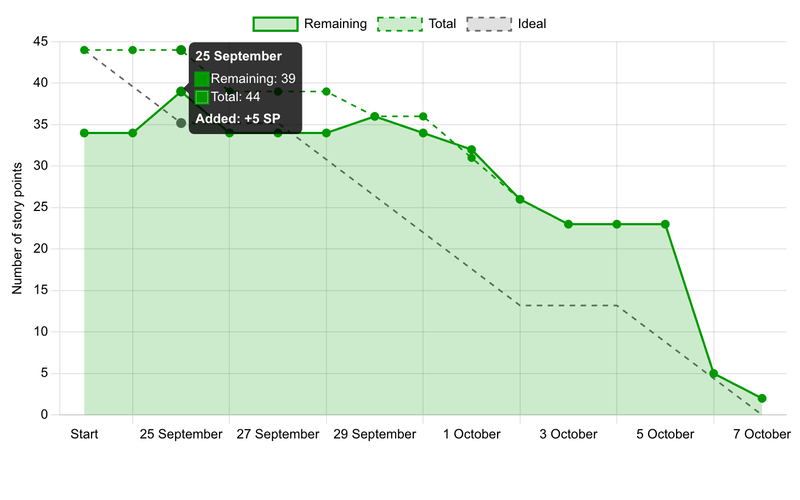
Tracks: how the work of one sprint was burned, and how the scope of the sprint changed on the way: issues added to the sprint or removed from it, and estimates raised or lowered.
How it differs from the regular chart
The regular chart takes the issues that are in the sprint today and draws them over the whole period with their current estimates. It cannot see that an issue joined the sprint on day 3, that its estimate was changed, or that it was closed and reopened. The sprint history chart follows every issue day by day.
| Regular chart | Sprint history chart | |
|---|---|---|
| Issues in the chart | Issues in the sprint now | Every issue that was in the sprint at any time |
| Estimates | Current values for all days | Value on each day |
| Added or removed issues | Not visible | Shown in the line and in the tooltip |
| Reopened issues | Not visible | Burned part goes back (negative Burned) |
How it is calculated
- Unit is the value of the Units option: issues, story points or hours. The weight of an issue is 1 for issues, its story points, or its estimated hours. A missing value counts as 0.
- An issue with a closed status is 100% burned, whatever its % Done says. An open issue burns by % Done (story points and hours). For the unit "issues", an issue is either open or closed.
- Remaining (solid line) is the sum of weight x (1 - burned part) over the issues that are in the sprint at the end of the day. Adding an issue raises it by the issue's remaining part, removing it lowers it, and an estimate change moves it by the difference.
- Total (dashed line) is the plan: the pace of burning without scope changes. It starts from the final scope of the sprint (the issues that are in it on the last day with their final estimates) and goes down as those issues burn. On the last day Total equals Remaining. A gap between the lines before that shows the effect of scope changes.
- Ideal (grey dashed line) is a straight line from the first Total value to 0 on the last day. Non-working days do not burn, so the line is flat on them (option Non-working days).
- Burned is the amount burned on the day. Reopening an issue or lowering its % Done gives a negative value (Reverted). Progress made before an issue entered the sprint is not counted as burned.
- Days are taken in your time zone. The first point, Start, is the state at the beginning of the first day. Each next point is the state at the end of that day.
Hover over a day to see Remaining and Burned. A day with scope changes also shows Added or Removed, for example Added: +5 SP, or Added: +10 SP (+13 SP / -3 SP) when both happened.
The tiles above the chart show Remaining, Burned, Avg. burned per day and the Forecast finish. With Non-working days off, averages and the forecast count working days only.
Example
One sprint, unit story points, Monday 5 to Friday 9 October.
| Issue | What happened |
|---|---|
| A | 3 SP, in the sprint from the start, never changed |
| B | Entered the sprint on 6 Oct with the estimate raised from 5 to 10 SP. Closed on 7 Oct. Reopened on 8 Oct with 7 SP and 50% done |
| C | Created in the sprint on 7 Oct, 8 SP |
| D | 50 SP, in the sprint from the start, removed on 7 Oct |
| Start | 5 Oct | 6 Oct | 7 Oct | 8 Oct | 9 Oct | |
|---|---|---|---|---|---|---|
| Remaining | 53 | 53 | 63 | 11 | 14.5 | 14.5 |
| Total | 18 | 18 | 18 | 11 | 14.5 | 14.5 |
| Ideal | 18 | 14.4 | 10.8 | 7.2 | 3.6 | 0 |
| Added | 0 | 10 | 8 | 0 | 0 | |
| Removed | 0 | 0 | 50 | 0 | 0 | |
| Burned | 0 | 0 | 10 | -3.5 | 0 |
- 6 Oct: B enters with 10 SP and nothing burned: Remaining 53 + 10 = 63.
- 7 Oct: B is closed, so all of its 10 SP burn. C enters (+8), D leaves (-50): 63 + 8 - 50 - 10 = 11.
- 8 Oct: B is reopened with 7 SP at 50%, so 3.5 SP come back: Burned is -3.5 and Remaining is 14.5.
- Total starts from the final scope: A + B + C = 3 + 7 + 8 = 18. The gap between Remaining and Total on 5 and 6 Oct is the scope that was removed later (D).
What to keep in mind
- The chart is as exact as the history. Changes of sprint and story points are recorded from the moment you update the plugin. For earlier days an issue is assumed to have always been in the sprint with its current values.
- The chart shows the issues you are allowed to see. Estimates that are empty count as 0 in that unit.
- Total and Ideal show the pace needed for the final scope. They are not a forecast; the forecast is the tile Forecast finish.
- The chart is built for up to 5000 issues and 100000 changes. If the sprint is bigger, a message is shown instead of the chart.