Snippets and Parts both hold a named block of content, and both are rendered through Liquid. The difference is who may use them: a Snippet belongs to the whole Site, a Part belongs to one Page.
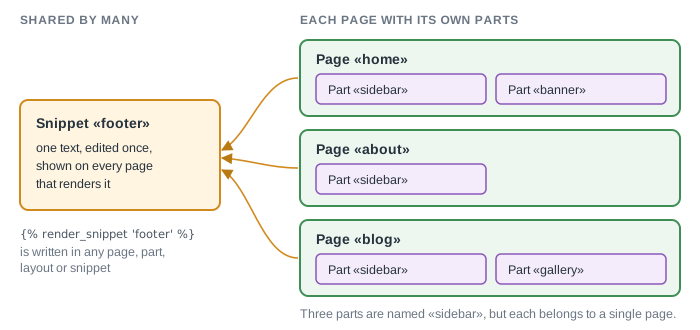
Compare
| Snippet | Part | |
|---|---|---|
| Belongs to | The whole Site | One Page |
| Used from | Any Page, Part, Layout or Snippet | Its own Page, through its Layout or its text |
| Tag | render_snippet 'name' |
part_content 'name' (rendered) or include_part 'name' (inserted, with variables) |
| Edited in | Snippets in the CMS sidebar | The Parts tab of the Page, and New part |
| Has its own address | No | Yes, a Part has a URL of its own, so it can be a stylesheet or a script |
| Cache | Follows the cache of the Page that renders it | Its own Cached option |
| Order | Not applicable | Parts named content are appended to the Page in the order of their position |
Use a Snippet for
- a menu, a footer or a cookie banner that every page shows;
- a repeated block such as a pricing table or a list of cards;
- a helper that other Snippets call.
Before you rename or delete a Snippet, open its Used in tab. It lists the Pages, Parts, Layouts and Snippets that render it by a literal name.
Use a Part for
- a block that exists on one Page only: its sidebar, a banner, a gallery;
- an extra block of the Page text. A Part named
contentis appended to the Page body, which lets you build a long Page from several blocks that are edited separately; - a stylesheet or a script that one Page owns.
Where else a value can live
- Page field: a named value of one Page, read as
page.fields. Use it for data such as a price, an author or the active menu item. - Global variable: a value for the whole Site, read as
site.variables. Use it for a phone number or an address. - Assets: files of the Site, read as
site.assets. Attachments of a Page belong to that Page. See How to use global assets and page attachments and How to use page fields and global variables.