Description of the problem
When you try to collect your emails for the Helpdesk, they do not come. And in your production.log (or redmine_helpdesk.log) file, you find the following error message:
Dispatch error: Couldn't find Issue without an ID
Solution
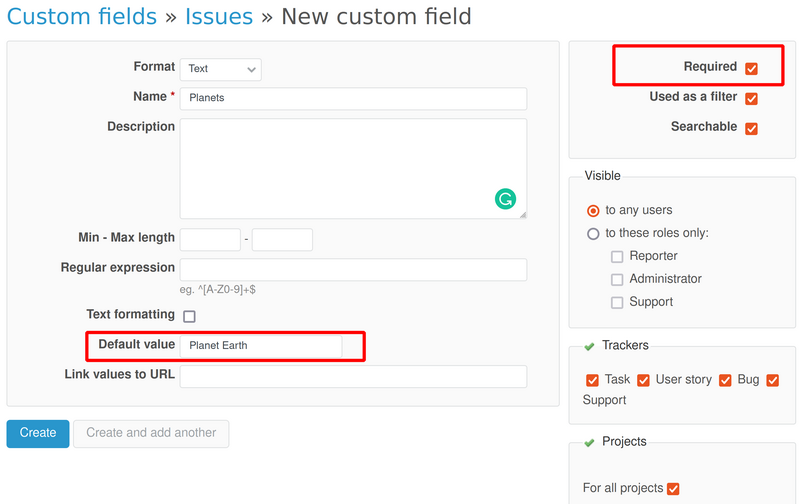
This error appears because you have defined a custom field and made it to be required. That's why the Helpdesk is breaking and the tickets do not come.
So, to fix this problem, you could pick some of the below 4 solutions:
1. Remove the custom field
2. Disable the "required" option of it
3. If you decide to keep the "required" option enabled, then please set some default value
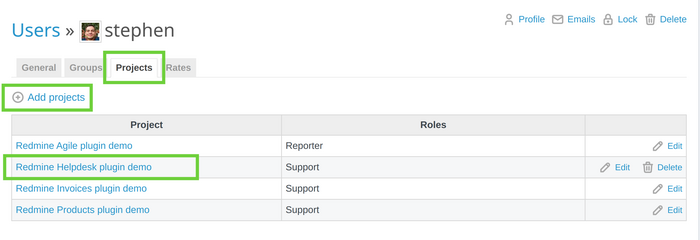
4. The problem could be that the user who should have ticket assigned has no rights in that particular project. To fix this problem, you (or the Redmine administrator) have to add the Redmine user you are logged-in with to be a member of the project where the Helpdesk is used (and enabled as a module). You have to go to Administration - Users - [select the needed user that has the notification problems] - Projects tab. Now add the Helpdesk project. Please see this picture to make the situation clear.
Then you need to enable the needed and specific rights for that user and project as shown in this article and video (rights/permissions related to issue tracking and Helpdesk).