
Helpdesk plugin adds some very useful filters in the Issues tab:
- Helpdesk contact (person from client team contacting helpdesk, ticket author)
- Helpdesk company (same as helpdesk contact, but with activated option Company)
- Ticket source (email, phone, web, conversation)
- Time to reaction (how fast the first action with the ticket was done. It covers any action - assignment, moving to another project, etc.)
- Time to first response (how fast was the first response sent)
- Time to resolve (how fast the latest response from the support team was sent)
- Vote (how helpdesk response was assessed)
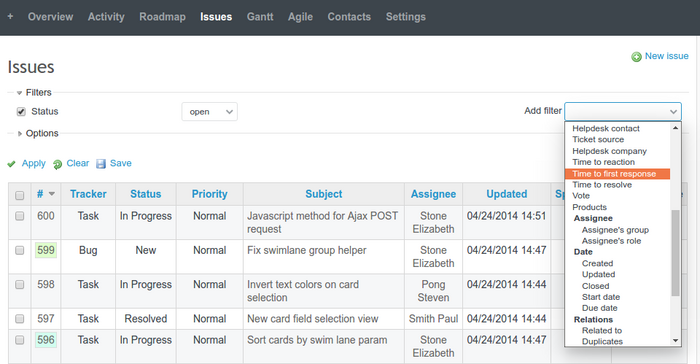
Please note, Helpdesk plugin requires another plugin - Contacts, which adds another two filters:
- Contact (name of the contact from Redmine, they can be CC'd or be manually added to the Contacts area in the issue)
- Company (contact with activated option Company)
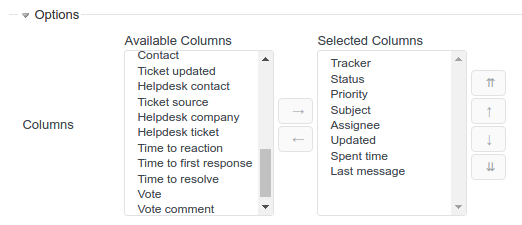
They can be used for filtering issues. Also, you can view Helpdesk data in the table - just add columns you would like to view. Click on Options and move columns from Available columns to Selected columns. After all, click Apply.
If you use certain filters or table columns often, it is worth saving as a custom query. Just click Save after you have applied all changes to the Issues table view, and adjust new custom query settings.
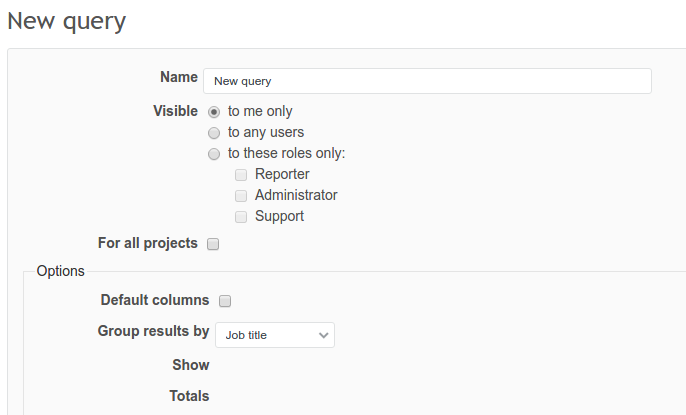
After saving, your new query will be visible on the right sidebar. More about custom queries here.