
This article is about the following errors.
Note: Please note that after version 4.1.12 of the Helpdesk plugin, there is an option added in the project helpdek settings to fix this problem:
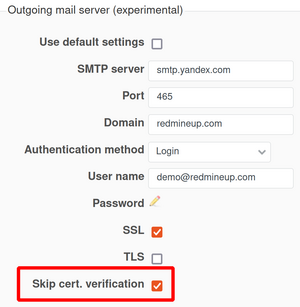
Error 1: Upon receiving mail
Error: SSL_connect returned=1 errno=0 state=error: certificate verify failed
Error 2: Upon sending mail
An error occurred while sending mail (hostname "some.hostname.xxx" does not match the server certificate)
In these cases, the following changes could help.
1. Error:
Create a new file config/initializers/bypass_ssl_verification.rb (the name of the file is not important) with the following content:
require 'openssl'
OpenSSL::SSL::VERIFY_PEER = OpenSSL::SSL::VERIFY_NONE
Save the changes and restart the webserver.
2. Error:
In file
plugins/redmine_contacts_helpdesk/app/models/helpdesk_mailer.rb
add the line
:openssl_verify_mode => OpenSSL::SSL::VERIFY_NONE,
at the place shown below:
  def set_delivery_options
    return false if HelpdeskSettings[:helpdesk_smtp_use_default_settings, project.id].to_i == 0
    message.delivery_method(:smtp)
    message.delivery_method.settings.merge!(:address => HelpdeskSettings[:helpdesk_smtp_server, project.id],
                            :port => HelpdeskSettings[:helpdesk_smtp_port, project.id] || 25,
                            :authentication => HelpdeskSettings[:helpdesk_smtp_authentication, project.id] || 'plain',
                            :user_name => HelpdeskSettings[:helpdesk_smtp_username, project.id],
                            :password => HelpdeskSettings[:helpdesk_smtp_password, project.id],
                            :domain => HelpdeskSettings[:helpdesk_smtp_domain, project.id],
                            :enable_starttls_auto => true,
                 here ->    :openssl_verify_mode => OpenSSL::SSL::VERIFY_NONE,
                            :ssl => HelpdeskSettings[:helpdesk_smtp_ssl, project.id].to_i > 0 &&
                                    HelpdeskSettings[:helpdesk_smtp_tls, project.id].to_i == 0)
  end
Save the changes and restart the webserver.